



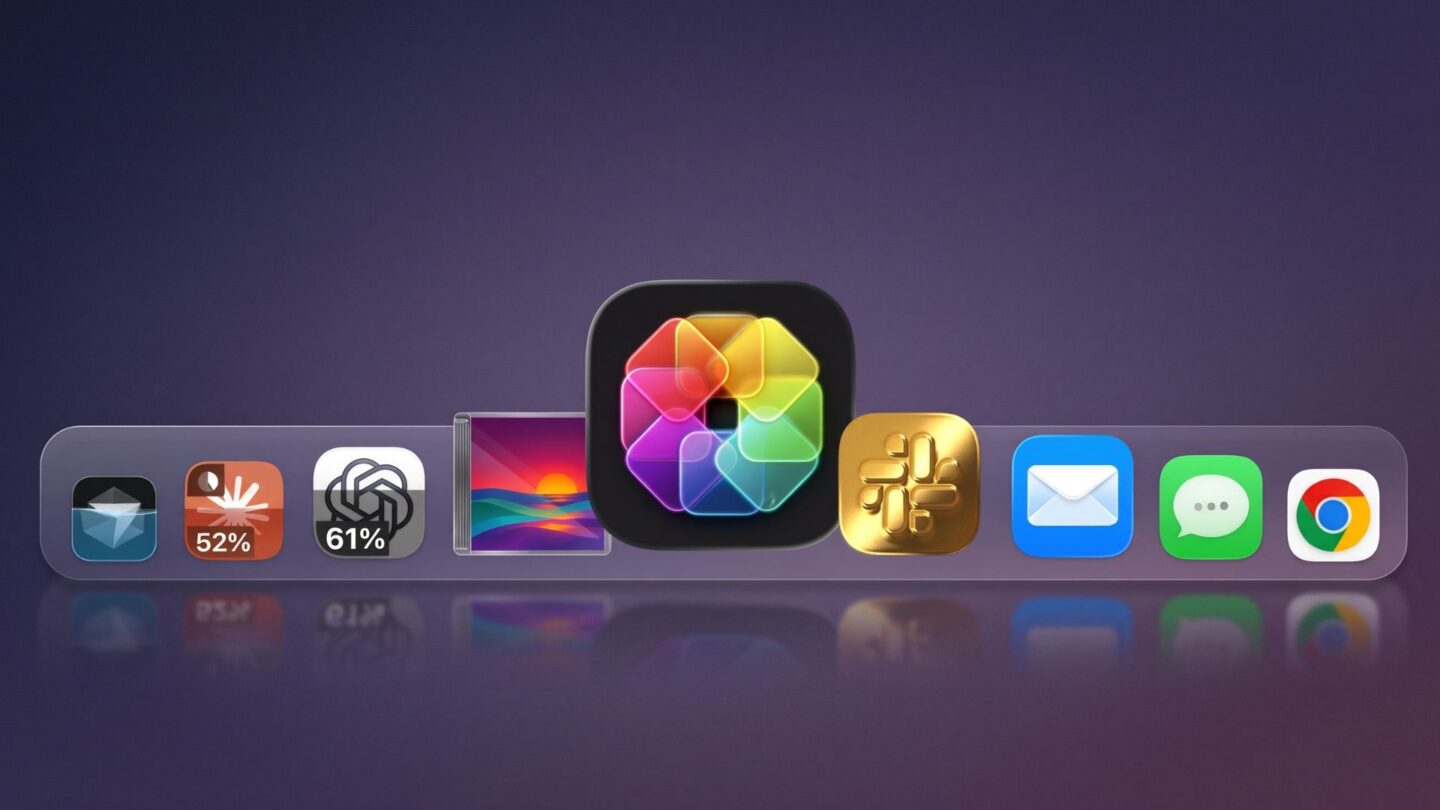
Mac users can now give their Dock a more personalised look with IconSwapper, a new utility that lets application icons display animations, visual effects, and live information. Developed by icon designer Michael Flarup, the application offers a range of customisation options, including AI usage indicators, music artwork and interactive elements that respond to activity on the computer.
Its creator describes IconSwapper as an icon studio for the Mac Dock, designed to make application icons more than static shortcuts. Instead of displaying the same artwork at all times, supported icons can change their appearance based on what an application is doing. The utility supports both Intel-based and Apple Silicon Macs running macOS 14 or later.
One notable feature is its ability to turn supported artificial intelligence applications into visual usage monitors. This lets users check their remaining allowances directly from the Dock without opening the applications. The utility also offers creative options for music applications, system tools and everyday software.
IconSwapper turns AI application icons into live usage indicators
IconSwapper’s Live Icon feature allows users to customise individual application icons with information and animations linked to their activity. Once an application is selected, users can choose a Live Icon design that changes based on supported features and available data.
I love icons. I’ve spent most of my career designing them. Now let’s bring them to life! Meet @IconSwapper. An icon studio for your Dock. Customize your existing app icons with artwork and shaders, then make them move and react to real-time data. Out now for Mac. https://t.co/hmlrjBrDuV
— Michael Flarup (@flarup) November 17, 2026
For AI applications, the utility can display usage information through the Dock. Supported applications include ChatGPT, Claude, Cursor and Codex. Rather than requiring users to open separate usage dashboards, the icons can quickly show how much of an available allowance has been consumed.
The feature also includes activity-based animations. When a supported AI assistant is processing a request, its Dock icon can animate to indicate that work is taking place. This provides a simple way to recognise when an application is active, particularly for users who regularly work with several AI tools at the same time.
Cursor users can also access percentage-based usage information and details about weekly allowance resets. This could help developers who depend on AI-assisted coding tools and want to monitor their consumption more closely. Having these indicators visible in the Dock may reduce the need to switch between applications to check usage limits repeatedly.
The live functionality extends beyond AI software. Spotify and Apple Music can display currently playing album artwork in different formats, including a jewel case, vinyl record or spinning disc. These designs let music applications reflect the content being played rather than showing their standard icons.
Other supported applications also receive interactive treatments. Finder can display animated eyes that follow the mouse pointer, while Safari’s compass icon can respond to page loading and downloads. Mail users can see the application’s envelope icon open as they compose a new message.
Some interactive features require additional macOS permissions, particularly those involving Automation and Accessibility. IconSwapper guides users through setup to help them grant the permissions needed for the selected customisations.
Custom artwork, shaders and decorations expand personalisation options
Beyond its live features, IconSwapper offers several tools to change the appearance of application icons. Users can begin with an application’s existing artwork, upload their own images or browse thousands of community-created icons available through the platform.
The customisation tools allow users to adjust colours and apply different visual treatments. These include shaders such as Gold, as well as finishes inspired by Apple’s Liquid Glass design language. These options give users greater control over their Dock’s appearance without requiring them to create every design from scratch.
The application also supports decorative elements that can be placed over icon artwork. Available decorations include string lights, pine sprigs and snow globes, offering additional ways to create themed designs. These features could appeal to users who enjoy changing their desktop appearance for different seasons, occasions or personal preferences.
The customisations are not limited to the Dock itself. Designs also appear in the macOS Command-Tab application switcher while IconSwapper is running. This provides a more consistent appearance when users move between open applications.
However, the changes are primarily visual and do not replace the original application files. The original application retains its identity, including its file icon when viewed in Finder. This means users can customise the appearance of frequently accessed applications without permanently changing their original software assets.
The combination of live information and visual customisation distinguishes IconSwapper from utilities that replace standard application artwork. Its features serve both practical and aesthetic purposes, letting users monitor selected application activity while making the macOS interface more personal.
IconSwapper launches with a one-time payment of US$19
IconSwapper is available through its official website for a one-time payment of US$19. The listed regular price is US$29, making the introductory offer US$10 cheaper than the standard price.
Unlike subscription-based software, the utility uses a one-time payment model. This means customers pay once rather than committing to recurring monthly or annual charges. The purchase includes a licence that can be used on up to three Macs, providing additional flexibility for people who use multiple Apple computers.
Payments are processed through Stripe on the IconSwapper website. Interested users can visit the official website to explore the available features and purchase the application.
The utility’s system requirements are relatively straightforward. It supports Intel and Apple Silicon Macs, provided they run macOS 14 or later. This makes it compatible with a range of relatively recent Mac computers rather than limiting access to the latest Apple hardware.
For users who spend much of their time working with AI assistants, music applications and other frequently used software, IconSwapper offers a different approach to managing the macOS Dock. Its live indicators can make selected application information easier to access, while its artwork tools add flexibility to the desktop’s appearance.
Although some features depend on application support and additional system permissions, the combination of live functionality, decorative options and a one-time purchase model gives IconSwapper a distinct position among Mac customisation utilities.