


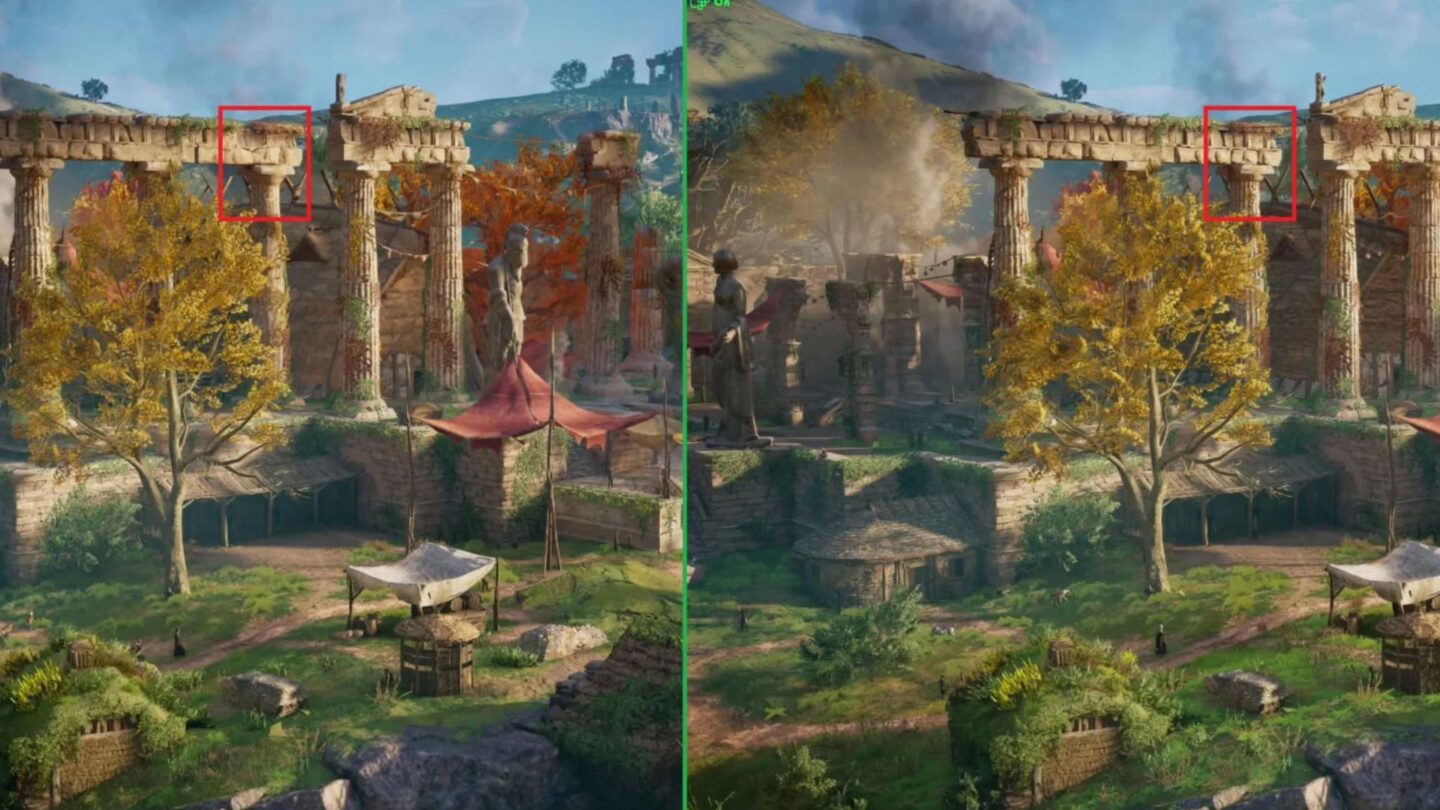
Microsoft is expanding access to its Windows-based Auto Super Resolution technology on PCs powered by Intel’s latest Core Ultra Series 3 processors. The update brings the operating system’s AI-powered upscaling feature to a wider range of laptops, desktops and gaming handhelds, giving users another way to improve game performance without relying on technology built directly into individual games.
Auto Super Resolution, commonly known as Auto SR, is Microsoft’s answer to game upscaling technologies such as Nvidia DLSS, AMD FSR and Intel XeSS. Rather than requiring developers to add the technology to each game, Auto SR operates at the Windows level and can work with a broad range of DirectX 10 and later titles. Microsoft says the latest expansion targets Intel Core Ultra Series 3-based Copilot+ PCs and adds support for input resolutions up to 1080p.
Auto SR comes to Intel’s latest processors
Microsoft announced the expanded support on 16 September, saying Auto SR is now available on Intel Core Ultra Series 3-based Copilot+ PCs. The technology is designed for games that struggle to maintain playable frame rates when running at higher resolutions or graphics settings. Instead of rendering every frame at the display’s full resolution, the game renders at a lower resolution, and Auto SR uses an AI model running on the device’s NPU to upscale the resulting image.
The approach can reduce the GPU workload while letting games maintain a higher effective output resolution. Microsoft says this can be used in several ways. Players can prioritise a higher frame rate, increase graphics quality while keeping performance close to its previous level, or, in some situations, improve both image quality and performance. The company’s own testing on an Intel Arc B390 GPU showed Assassin’s Creed Valhalla running at 1,600p with Ultra High settings at an average of 52 frames per second when Auto SR upscaled from 1,050p. A native 1,600p configuration using High settings averaged 45 frames per second.
The technology is especially relevant to gaming laptops and handheld PCs, where limited power and cooling can make high-resolution gaming harder. Intel’s latest platforms include both CPU and NPU resources that Auto SR can use, potentially allowing the GPU to devote more processing capacity to rendering game frames. Microsoft is also exploring ways to extend Auto SR towards higher frame-rate targets, including 90fps to 120fps scenarios.
Thousands of DirectX games can use the technology
One of Auto SR’s main differences from technologies such as DLSS and XeSS is that it does not require individual game developers to integrate an upscaling system. Microsoft says the feature can be used with DirectX 10 and later games, potentially making it available across thousands of existing titles. The company recommends trying it particularly with texture-heavy games running at higher resolutions and graphics settings.
Microsoft’s examples include Assassin’s Creed Shadows, Assassin’s Creed Valhalla, Assetto Corsa, Avowed, Control, DOOM: The Dark Ages, Far Cry 6, Frostpunk 2, Grounded 2, Psychonauts 2, Rise of the Tomb Raider, The Outer Worlds 2 and Tom Clancy’s Rainbow Six Siege. The company’s testing of Assassin’s Creed Shadows showed that Auto SR could allow Ultra High graphics settings while maintaining a frame rate close to a much lower graphics configuration.
The technology also differs from game-integrated super resolution because it does not have access to the same rendering information available to an upscaler built into a game. Microsoft therefore continues to recommend using integrated solutions such as Intel XeSS when a game already supports them. If XeSS or another in-game upscaler is available, Microsoft recommends disabling Auto SR rather than running both systems together.
For compatible Intel systems, users can install Auto SR through Microsoft’s Auto Super Resolution package. The company says users do not need to understand the underlying rendering technology to use it, as the feature is intended to provide a relatively straightforward way to balance image quality and performance.
Auto SR still has limitations
Despite the wider hardware support, Auto SR is not intended to replace game-integrated upscaling in every situation. Microsoft says the AI model is trained around specific input resolutions, meaning results can vary when games are configured outside the recommended range. On Intel Core Ultra Series 3 devices, the supported input range extends up to 1080p, while Microsoft recommends using the appropriate supported resolution for the best results.
The technology also processes the complete game image, including interface elements. This can affect the clarity of text, menus and other fine details. Microsoft acknowledges that “text & fine UI detail appear ‘fainter’” when Auto SR is used. Post-processing effects such as film grain can also affect the final image, and Microsoft recommends disabling them in some cases to produce cleaner results.
Performance can also vary depending on the device’s power settings. Because Auto SR uses the NPU alongside the CPU and GPU, the available power budget can influence results. Microsoft notes that some devices may see a small frame-rate reduction, even though the GPU does less work per frame. This means Auto SR is best viewed as another option for balancing graphics quality, performance and power consumption rather than a guaranteed performance boost.
The expansion nevertheless gives owners of Intel’s latest laptops and gaming handhelds another way to make demanding games more manageable. By bringing AI-based super resolution into Windows itself, Microsoft is trying to extend the benefits of upscaling beyond games specifically developed to support it.