

AI-powered notetaker has become an essential tool for meetings, interviews, and briefings, turning spoken dialogue into searchable text and structured notes. However, the hardware remains largely fragmented from daily workflows. Dedicated audio recorders require manual setup and extra pocket space, while software tools tie users to an open laptop or an active smartphone app.
Our verdict
The viaim OpenNote combines open-ear earbuds with dedicated recording and AI note-taking in a form designed to stay useful throughout the working day. Strong speech isolation, effective background-noise suppression and 600 free transcription minutes per month make it particularly capable for meetings, interviews and briefings, while advanced AI models improve transcription quality. Its open-ear design is less suited to immersive music listening, and important names and unfamiliar terminology can still require verification.
Pros
- Combines AI note-taking, recording and everyday audio in one device
- FlashRecord allows recording to begin directly from the earbuds without opening the phone app
- Strong speech capture with effective background-noise suppression
- 600 free transcription minutes per month, twice the allowance of free tiers from compeitions
Cons
- Names, acronyms and unfamiliar terminology can still require checking
- Transcription quality varies noticeably depending on the AI model selected
Earbuds present an obvious, integrated alternative. Already worn for calls and media playback during the day, an open-ear design maintains situational awareness without requiring constant removal. Embedding recording hardware directly into this form factor makes capturing conversations far more frictionless, provided the microphones can capture surrounding voices clearly, and the companion software delivers dependable notes.
The viaim OpenNote builds entirely around this idea, pairing open-ear audio with dedicated recording, automated transcription, and AI summarisation. Beyond everyday listening and voice calls, it is designed to capture in-person discussions without a secondary device. The success of that hybrid approach rests on three core criteria: all-day comfort and playback quality, microphone range during multi-speaker conversations, and the speed and accuracy of viaim’s post-processing pipeline.
Open-ear design fits naturally into a workday
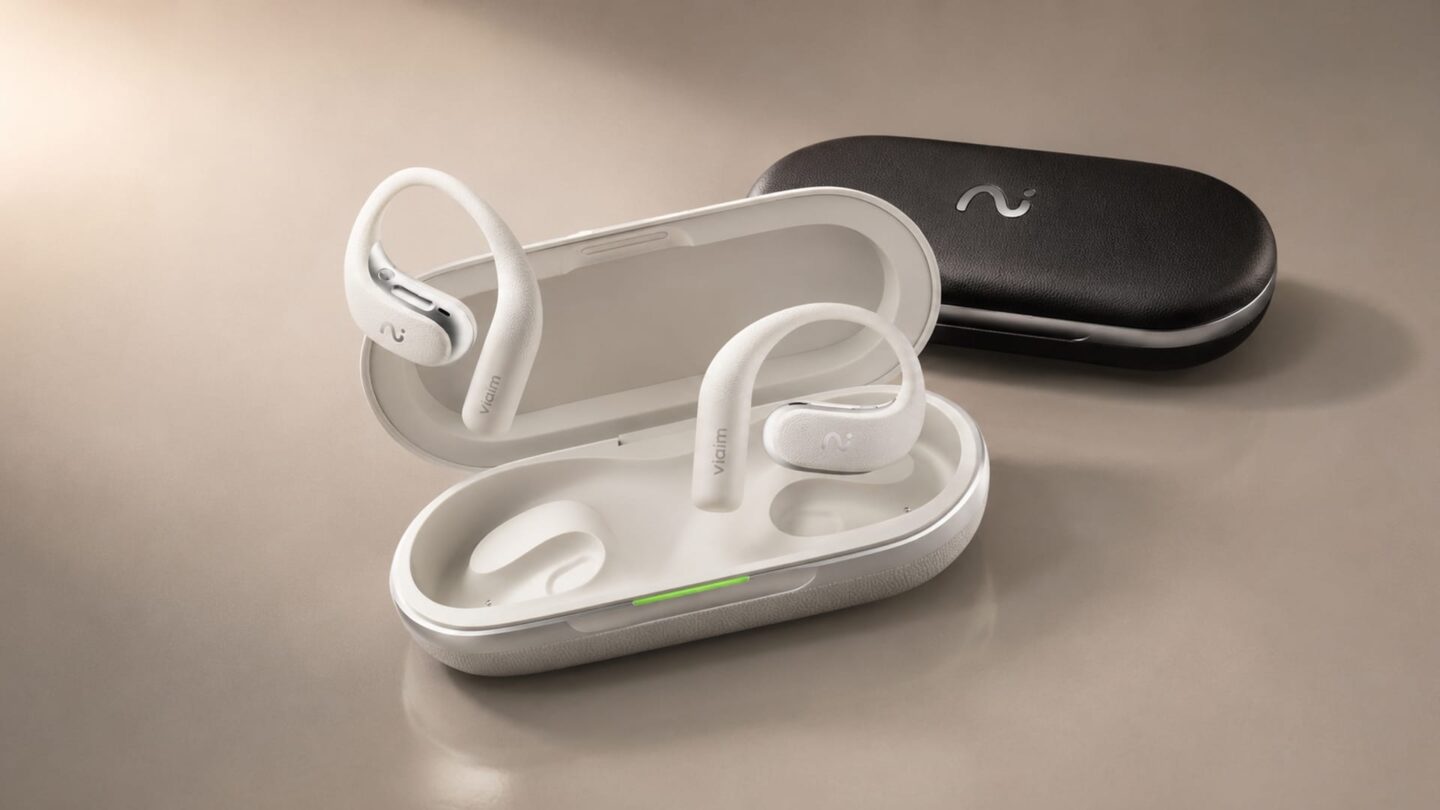
OpenNote uses an open-ear design that hooks around the ear instead of plugging the ear canal. At 10.5g per earbud (paired with a 55.5g charging case), the fit leaves ambient sound audible, making it practical for offices, events, or any setting where you need to stay aware of your surroundings.
Unlike a separate audio recorder that may stay in a pocket or bag until a meeting begins, OpenNote can already be in use for calls or audio when a conversation needs to be captured. In such situations, recording can then begin from the earbuds without switching devices or reaching for another piece of hardware.
Bluetooth 5.3 and dual-device pairing fit a standard workplace setup. You can switch smoothly between a laptop and a smartphone without repeatedly disconnecting and reconnecting the earbuds.
Battery life is rated at up to 19 hours on a single charge, reaching up to 53 hours with the charging case. Real-world performance will depend on volume levels, call time, and active recording, but these numbers offer plenty of headroom for a full working day.
Naturally, the open design does not block out background noise like traditional in-ear buds. For a device built around workplace conversations and meetings, however, being able to hear colleagues and stay tuned into the room is a practical advantage rather than a drawback.
Recording performance with strong noise suppression
FlashRecord is what sets OpenNote apart from standard wireless earbuds. You can start recording directly from the earbuds without opening the phone app first, making it quick to capture a briefing, interview, or spontaneous conversation. A four-microphone system handles in-person discussions, phone calls, and other spoken audio, fitting naturally into how the earbuds are already used throughout the day.
In testing, background noise reduction proved especially effective. During quiet pauses, the processed output dropped to around -85 dBFS, showing aggressive suppression whenever speech stopped. While this figure reflects viaim’s software processing rather than the microphones’ raw physical noise floor, the real-world benefit was obvious, keeping voices well separated from room noise and pauses noticeably clean.
This works particularly well in press conferences, presentations, and busy event venues, where air conditioning, nearby chatter, and general room ambience often bleed into a recording. OpenNote keeps speech easy to follow without letting background distractions take over the track.
The audio processing also focuses heavily on vocal clarity. Around 57% of measured speech energy sits between 500 Hz and 2 kHz, concentrating the sound around frequencies that help words and consonants remain distinct. As a result, speech sounds crisp and well defined, even in noisy surroundings. You can also hear some digital processing behind that clarity. Voices sound slightly leaner than in an unfiltered recording, with less low-end warmth, but speech never becomes tiring or difficult to follow. For meetings, interviews, and briefings, OpenNote’s tuning sensibly prioritises clear words and clean background separation over a deep, natural tone.
Transcription and AI turn recordings into usable notes
Once recording ends, OpenNote moves into its AI workflow. The viaim app can generate full transcripts, identify different speakers, and create summaries, with timestamps linking every section of text directly back to the original audio.
The choice of AI model makes a noticeable difference to transcription quality. In testing with a speech containing Singapore organisations, policy terms, and specific figures, Gemini Pro performed considerably better than the ChatGPT Standard option. Gemini Pro correctly captured references such as “Hangzhou”, “more than S$1 billion”, and “four national AI missions”, all of which the Standard model misheard. It also understood basic sentence context better, transcribing “gains” accurately where the Standard model wrote “games”.
Switching to Gemini Pro (or any advance AI models) improved OpenNote’s transcription considerably. It preserved the core meaning and key figures more reliably while capturing nearly all of the speech. For users who regularly record meetings, interviews or briefings, that improvement gives a clear reason to upgrade, particularly because it reduces the amount of manual correction needed afterwards.
Unfamiliar names, acronyms, and organisations are still the areas most likely to need a manual check. For everyday meeting notes, small mistakes are easy to manage, but tasks that require exact quotes or strict accuracy will still need a quick check against the audio.
viaim makes that checking process straightforward through detailed timestamping. The app breaks the transcript into short, time-marked blocks, so you can jump straight to the relevant part of the recording instead of manually scrubbing through a long audio file. This accurate timestamping stood out as one of OpenNote’s strongest workflow features in testing.
Beyond standard transcripts, the software supports speaker labels, action items, mind maps, custom summary formats, and the Vitana assistant, with support for 78 languages.
The Basic plan includes 600 transcription minutes per month, which is equivalent to 10 hours, covering light use without forcing an immediate paid upgrade. The Pro tier increases that allowance to 1,800 minutes, while the Ultra tier offers unlimited transcription.
Music remains secondary to the productivity focus
OpenNote also works as a standard pair of Bluetooth earbuds for music, podcasts, and daily listening. viaim uses a racetrack-shaped dynamic driver inside each earbud, supporting standard SBC and AAC audio codecs, as well as LHDC on compatible devices.
The open-ear design has a far bigger impact on the listening experience than supported codecs. Because your ear canal stays open, background noise naturally blends in with whatever you are playing. This works well in an office or while walking outdoors, where staying aware of your surroundings helps, but the trade-off shows up in noisy settings, where OpenNote cannot block out sound like sealed in-ear buds. As a result, sound quality is best suited for phone calls, podcasts, and casual music listening rather than immersive audio. Anyone looking for deep, heavy bass or trying to cut out train and aeroplane noise will still be better served by conventional noise-cancelling earphones.
Even so, everyday audio playback is essential to making OpenNote a device you can wear all day. Being able to listen to music, take a phone call, and seamlessly start recording a meeting without swapping hardware is where its real strength lies, rather than trying to rival dedicated music earbuds.
How OpenNote compares with Plaud and Otter
OpenNote sits between two distinct approaches to AI note-taking. Plaud Note Pro is a standalone recorder designed to capture discussions before processing them through its app, while Otter AI takes a software-first route that records directly through phones, laptops, and virtual meeting platforms. OpenNote bridges both worlds by embedding dedicated recording hardware into everyday open-ear earbuds.
In testing, Note Pro held a slight edge in overall transcription accuracy, especially with numbers, context, and specific technical terms. OpenNote closed that gap significantly when switched to Gemini Pro, while also capturing nearly all of the source speech and offering more precise timestamps to help locate specific moments in the audio.
Audio tuning also showed clear differences. Note Pro captured a warmer, more natural voice with steady volume levels. In contrast, OpenNote cut out background noise more aggressively and focused on speech clarity, making it the best among the competition. That tuning is particularly helpful in briefings, conferences, and noisy rooms where a speaker has to compete with room noise.
Otter AI took a software-driven route. Its raw recording picked up noticeably more room noise and captured the speaker at a lower volume, yet its transcription engine still turned the audio into accurate text. This makes Otter AI a good choice for users who prefer an app-based setup and want to avoid carrying extra hardware.
Choosing between them comes down to daily working habits. Plaud Note Pro suits users who want a dedicated pocket recorder they can place on a table during meetings. Otter AI fits those who prefer working entirely through software on their existing phones or computers.
OpenNote offers a different kind of convenience. With the recorder built into earbuds that can already be used for music, calls and online meetings, conversations can be captured without reaching for a separate device. Strong background-noise reduction, detailed timestamps and improved transcription through Pro AI models further support meetings, interviews and other situations where recorded conversations need to be turned into usable notes.
| Key factor | Plaud Note Pro | Otter AI | viaim OpenNote |
|---|---|---|---|
| Recording quality | 93% | 78% | 94% |
| Transcription accuracy | 89% | 86% | 87% |
| Noise handling | Excellent | Fair | Excellent |
| Transcript completeness | Good | Excellent | Excellent |
| Timestamp precision | Good | Limited | Excellent |
The verdict: viaim OpenNote
The viaim OpenNote brings voice recording, AI note-taking, and everyday audio together in a design that fits smoothly into a daily working routine. Its open-ear fit remains comfortable for long calls and extended wear, while FlashRecord lets you start capturing a meeting or interview immediately instead of reaching for a separate recorder.
Recording quality is a genuine strength, keeping speech clear and cutting out background noise effectively during presentations, events, and group discussions. That hardware is backed by a capable AI workflow. The paid plans (Pro and Ultra) open access to advance models like ChatGPT Pro, Gemini Pro, and Claud Pro, offering accurate transcription and AI summaries, while detailed timestamps make it quick to check unfamiliar names or specific quotes against the original audio.
While music playback takes a backseat to situational awareness, that trade-off makes sense for a productivity-focused device. For journalists, researchers, and professionals who regularly balance calls, meetings, and interviews throughout the day, OpenNote carves out a practical middle ground between dedicated voice recorders and standard wireless earbuds.