

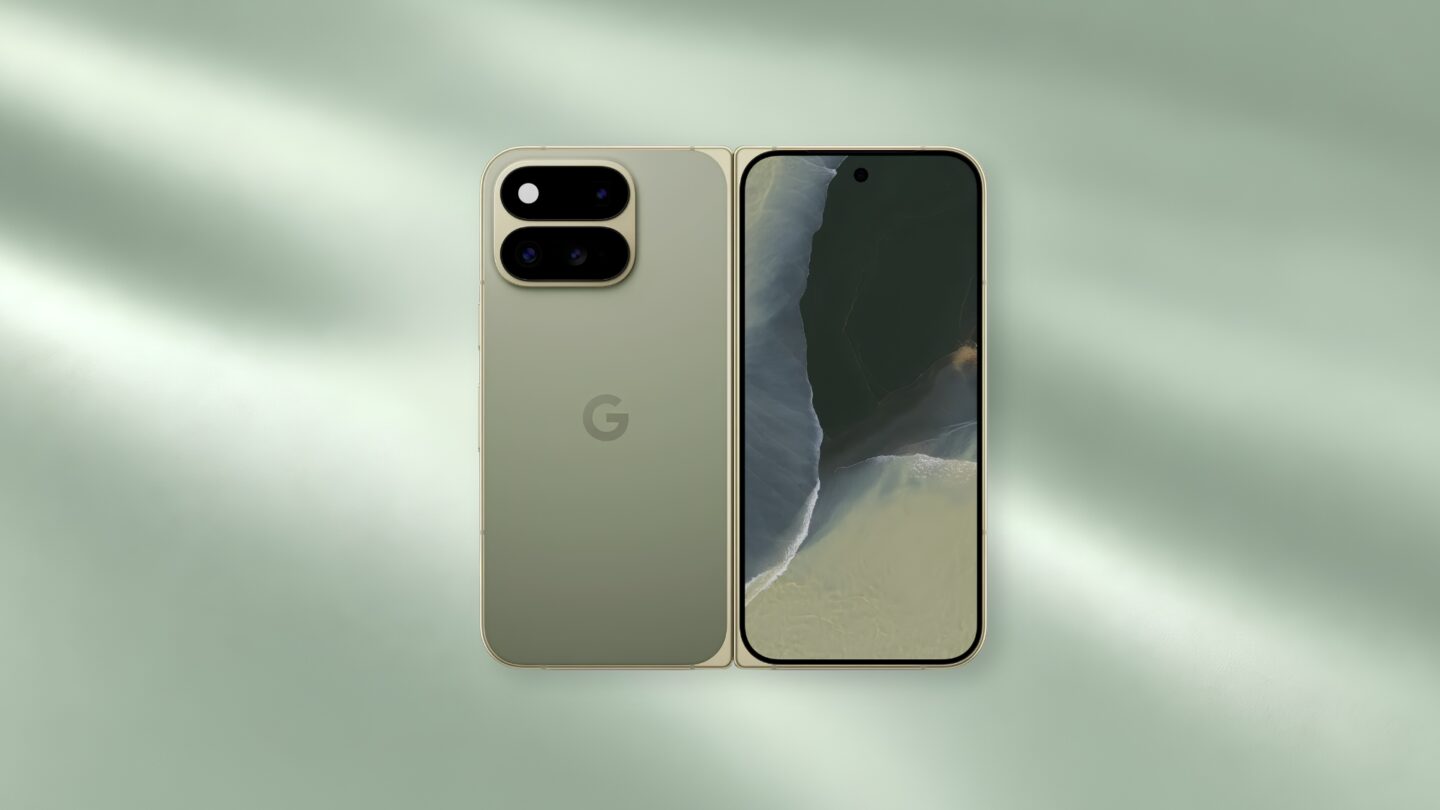
The foldable phone market has moved quickly since Google released the original Pixel Fold. What began as a category defined by thick frames and hefty bodies has rapidly shifted towards sleeker, more pocket-friendly designs. Samsung continues to trim its competing models to feel more like traditional handsets, while other phone makers have managed to fit larger batteries into increasingly thinner frames.
Our verdict
The Google Pixel 11 Pro Fold combines a lighter 239 g design with a bright 8-inch inner display, responsive everyday performance and a capable main camera. Android 17 makes good use of the larger screen for multitasking, while built-in Pixelsnap magnets improve wireless charging convenience. Its smaller battery, visible display crease, weaker secondary cameras and reduced sustained GPU performance limit its appeal against newer foldables and Google’s own Pixel 11 Pro.
Pros
- Lighter 239 g body makes everyday handling noticeably easier
- Strong main camera with reliable exposure, controlled HDR and consistent colour
- 8-inch inner display works well for multitasking, reading and productivity
Cons
- Sustained GPU performance drops noticeably under longer workloads
- Battery capacity is smaller than the previous generation
- Camera hardware falls behind the cheaper Pixel 11 Pro
The Google Pixel 11 Pro Fold meets this stiff competition with a measured update rather than a complete overhaul. Google keeps the familiar book-style shape, but trims away enough thickness and weight to make the phone far easier to carry and use one-handed when closed. The hardware retains built-in Pixelsnap magnets while increasing wireless charging from 15 W to 25 W with Qi2.2 support. Rather than reinventing the category, the focus centres on cutting down the practical friction points that often make folding devices cumbersome to live with. Thick folded profiles, heavy bodies, and awkward one-handed typing frequently push owners back to conventional phones.
Under the hood, the upgrades take a similarly practical approach. Both screens are noticeably brighter for outdoor use, the Tensor G6 chip replaces the older Tensor G5, and the main camera gets a larger sensor, setting the stage to see how well these changes translate to daily work, photography, and battery life.
A lighter body is easier to carry
The Pixel 11 Pro Fold weighs 239 g, down from the 258 g of the Pixel 10 Pro Fold. Its folded thickness also drops from 10.8 mm to 10.1 mm, while the unfolded body measures just 5 mm at its thinnest point.
That 19 g reduction makes a clear difference in everyday use, mainly because so much routine interaction still happens with the phone closed. Typing quick messages, browsing the web, and general one-handed handling feel far less tiring over a full day than on the previous model. Even so, 239 g remains a substantial weight to carry around, especially next to conventional flagship phones and some of the newer foldables on the market.
Google pairs a matte composite back with a satin-finish aluminium frame, offering two colour options: a warmer Olive finish alongside a more restrained Obsidian. The hinge holds firmly at different angles for tabletop use, and IP68 protection adds everyday resistance against dust and water.
Open the phone, and the crease across the inner display remains visible under overhead lighting and from wider angles, though it fades from view when you look straight at the screen.
The outer display handles most phone tasks
The 6.5-inch cover display uses a 1080 × 2342 OLED panel with a 1–120 Hz adaptive refresh rate. Google rates peak brightness at 3,600 nits, up from 3,000 nits on the previous generation.
Its proportions make the phone easy to use without unfolding it. Messaging, maps, web browsing and quick camera access all fit comfortably on the cover screen, leaving the larger display for tasks that benefit from more space.
Opening the device reveals an 8-inch OLED panel with a 2076 × 2152 resolution and the same 1–120 Hz refresh range. Documents, websites, maps and photo galleries gain useful width, while two apps can sit side by side without either becoming too narrow.
The near-square aspect ratio leaves sizeable black areas around 16:9 video. Films and YouTube therefore use less of the available panel than the 8-inch diagonal might suggest, while reading, editing and multitasking make better use of the shape.
Tensor G6 is quick in daily use but less dependable under sustained load
Google pairs the Tensor G6 chip with 16 GB of RAM across every storage option. Internal storage begins at 256 GB, with 512 GB and 1 TB options also available, while Google uses Zoned UFS storage on the two higher capacities. In testing, Geekbench 7 returned 2,327 in single-core and 7,093 in multi-core performance. Daily handling felt smooth and responsive, with app launches, split-screen work, camera processing, and heavier multitasking showing no obvious slowdown during normal use.
Graphics performance proved more uneven once testing moved beyond basic tasks. A Geekbench 7 GPU run scored 6,675, while a single 3DMark Wild Life Extreme test produced 3,469 at an average of 20.78 FPS. Graphical testing wasn’t entirely seamless, as the heavier 3DMark Steel Nomad Light benchmark repeatedly failed to start or run.
Sustained workloads revealed noticeable thermal throttling across repeated testing. An initial 20-loop 3DMark Wild Life Extreme stress test recorded a high score of 3,179 and a low of 2,630, delivering 82.7% stability as the body temperature rose from 30°C to 38°C and the battery fell from 58% to 48%. A second stress run showed an even steeper performance drop, starting at 3,448 before sliding to 2,417 for a stability score of 70.1%. During that second run, the temperature climbed from 27°C to 42°C, the battery dropped from 47% to 35%, and frame rates fluctuated between 10 FPS and 24 FPS.
Together, the two stress tests show that longer graphics workloads can reduce performance by about 17% to 30% from the best loop. Tensor G6 handles everyday productivity and browsing with complete ease, but demanding games and sustained graphics tasks put far more load on the chip and cooling system than short benchmark runs suggest.
The main camera produces balanced results
On the back of the phone, the camera setup brings together a 48 MP main camera with a 1/1.56-inch sensor, a 10.5 MP ultrawide, and a 10.8 MP 5x telephoto. Digital Super Zoom stretches that reach up to 30x, while selfie duties on both displays rely on matching 10 MP front cameras.
The main camera handled tricky mixed lighting especially well in the outdoor Chinese chess test. Players in deep shade stayed clearly exposed, while the sunlit street behind them held its colour and finer background details. Even under those competing light levels, the red and yellow game pieces remained sharp and easy to tell apart. Google’s HDR processing lifted the darker areas cleanly without stripping away the natural contrast between bright sun and shade.
Daylight photos taken around the temple and nearby shophouses showed that same steady control. Painted reds, ornate gold trim, and open blue skies stayed rich without drifting into unnatural oversaturation, keeping window frames, roof details, and shop signs clearly defined.
The ultrawide camera captured the temple courtyard’s sheer scale effectively, giving the scene plenty of room. However, buildings positioned near the outer edges of the frame showed visible stretching. Architectural shots with prominent vertical lines naturally make that distortion much easier to spot than open landscapes or less structured subjects.


Photo taken with Google Pixel 11 Pro Fold (left) vs photo taken with iPhone 17 pro Max (right)
Examining close details reveals more of Google’s aggressive processing style. Roof tiles, gold ornaments, and tree leaves appear crisp and clear when viewed normally on a phone or laptop screen. Zooming in on fine foliage, however, shows that thin leaves and branches can look slightly over-sharpened up close. Google clearly favours strong edge definition and heavy local contrast throughout its processing pipeline. That approach gives photos immediate clarity and punch, though it can make delicate textures look somewhat processed up close.
Two direct comparison shots taken alongside an iPhone 17 Pro Max highlight clear differences in colour and tone. In the temple roof test, the Pixel delivers sharper edge definition across the leaves and roof tiles, leaning into deeper reds and slightly cooler greens, whereas the iPhone renders the same scene with warmer ambient colours and far gentler transitions between highlights and shadows.


Photo taken with Google Pixel 11 Pro Fold (left) vs photo taken with iPhone 17 pro Max (right)
The signboard comparison follows an identical visual pattern. Here, the Pixel keeps the black board much darker and gives the gold lettering punchier contrast, helping preserve more of the wood’s surface texture. The iPhone takes a different route by lifting the midtones and warming the gold lettering to produce a brighter overall image. That extra brightness makes the sign pop, but it leaves the black wooden background looking noticeably flatter by comparison.
Neither treatment is universally superior, as each reflects different visual priorities. The Pixel favours a crisper, contrast-heavy presentation, while the iPhone leans towards warmer colours and softer tonal transitions, creating differences that stand out immediately without needing to crop into the files.
The 5x telephoto provides genuine optical reach for isolating architectural details and smaller objects. Google also rates 10x as delivering optical-quality results, although testing showed progressively weaker detail as magnification moved further beyond the native 5x focal length. Because of that drop, the cleanest and most dependable results come from staying close to the optical range.
The camera setup also highlights an obvious hardware compromise compared with the standard Pixel 11 Pro. Google’s traditional flagship features higher-resolution ultrawide and telephoto sensors, pushes digital reach up to 120x Pro Zoom, and offers 8K video at 24/30 FPS through Video Boost. By comparison, the Fold tops out at 30x zoom and 4K recording. Buyers end up paying a substantial premium for the folding screen while getting lower-tier secondary cameras than Google’s cheaper Pro handset.
Even with those hardware trade-offs, the folding design introduces several practical shooting modes. Magic Capture records video and photos with a single tap, then automatically edits, crops and unblurs a curated selection, which can be useful for fast or unpredictable subjects. Features like Dual Screen Preview, Rear Camera Selfie, and Tabletop Mode also take full advantage of the split screen and folding hinge for group framing, self-portraits, and hands-free shooting.
Android 17 makes better use of the inner display
Android 17 gives the larger display plenty of flexibility through split-screen layouts and floating app bubbles, giving the Fold several practical ways to juggle multiple tasks at once. A conversation, delivery tracker, or video can sit neatly above another application without blocking out most of the main window.
Google’s own apps generally adapt well to the wider canvas, reorganising content to use the extra room sensibly. Third-party software remains far more uneven overall. Certain apps stretch their standard phone layouts awkwardly or leave wide bands of unused space, meaning the daily experience still depends partly on how actively individual developers support large screens.
Google promises seven years of OS, security, and Pixel Drop updates to back up the hardware. That extended support window gives Android’s large-screen features and third-party apps plenty of time to improve over the device’s lifespan, offering welcome reassurance on a phone that costs considerably more than a standard flagship.
Battery capacity drops while wireless charging improves
The Pixel 11 Pro Fold runs on a 4,806 mAh battery, down from the 5,015 mAh capacity in the previous model. Real-world battery life varies considerably depending on which screen does the heavy lifting throughout the day. Simple tasks on the cover screen draw power at a steady, manageable rate. However, pushing the large 8-inch panel through long stretches of 5G navigation, gaming, and camera sessions drains the smaller cell far more quickly, making power management necessary on busy days away from a desk.
Wireless charging improves to up to 25 W through Qi2.2-certified Pixelsnap charging. Built-in magnets let the phone click securely onto compatible charging pads and stands without an extra magnetic case, keeping everyday alignment quick and hassle-free.
Wired charging remains more restrained, taking roughly 30 minutes to reach about 50% with a compatible 30 W USB-C PPS adapter or higher. Google doesn’t bundle a charger in the box, so anyone without suitable USB-C hardware will need to source one separately. Between the reduced battery capacity and standard wired speeds, power delivery is a clear compromise, especially when rival foldables fit larger batteries alongside much faster charging hardware.
The verdict: Google Pixel 11 Pro Fold
The Google Pixel 11 Pro Fold is noticeably easier to carry than its predecessor, trimming down just enough bulk to make everyday handling less of a chore. Its 6.5-inch outer screen behaves like a normal smartphone, handling messaging, quick navigation, and calls without forcing the device open. Unfolding the phone reveals a spacious 8-inch canvas that gives documents, spreadsheets, and split-screen apps plenty of room to breathe, backed by sensible multitasking tweaks in Android 17.
Camera performance stands out as another dependable asset, led by the upgraded main sensor. Real-world photos demonstrate reliable exposure in tricky lighting, well-balanced HDR, and natural colours. Side-by-side shots against the iPhone 17 Pro Max underline Google’s signature look, leaning into punchier local contrast and defined edges rather than warmer, softer transitions.
Even so, testing highlights several familiar trade-offs that are hard to ignore. The display crease remains more pronounced than on rival foldables, sustained gaming causes performance to drop over time, and the battery is smaller than before. Google also reserves its most capable camera hardware, deeper zoom reach, and 8K video for the cheaper, conventional Pixel 11 Pro.
These realities clearly define the target audience. The Pixel 11 Pro Fold makes good sense for buyers who value Google’s clean software and genuinely plan to use the large inner screen for reading, navigation, and side-by-side multitasking. Those who care primarily about top-tier zoom cameras, all-day battery endurance, or sustained gaming will still find better value in a traditional flagship.