

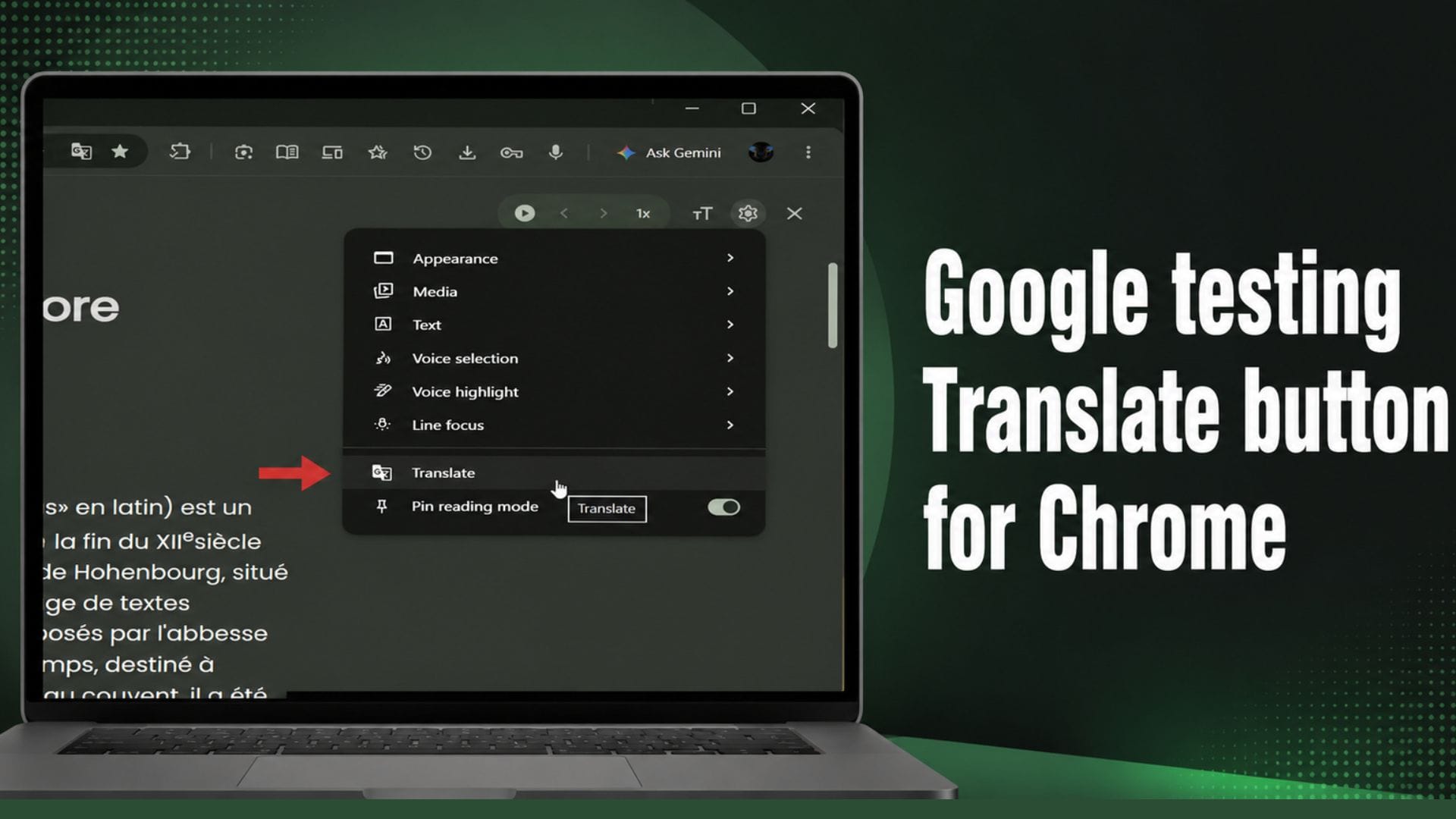
Google is testing a new translation feature for Chrome’s Reading Mode that could allow users to translate web pages and PDF documents without leaving the distraction-free reading interface. The feature has appeared in Chrome Canary, the experimental version of the browser used to trial new tools before they are considered for a wider release.
Although the translation option is visible in some early test builds, it is not yet functional. The move suggests Google is preparing to expand Reading Mode with built-in language translation, making it easier for users to read content in their preferred language without switching views or relying on separate browser tools.
Translation option appears in experimental build
The new feature was first highlighted by X user @Leopeva64, who shared a demonstration showing a Translate button within Reading Mode’s settings menu. The button appears alongside existing controls for themes, fonts, images and links, indicating that Google intends to integrate translation as part of the Reading Mode experience.
Google is testing a new "Translate" option in Chrome's Reading Mode settings menu. Currently in Canary, clicking this option doesn't actually translate the page or the PDF file yet: https://t.co/DEQVwR1Eqg pic.twitter.com/7KvzGUDMxo
— Leopeva64 (@Leopeva64) July 24, 2026
At present, selecting the Translate option produces no result. Google appears to have added the interface before enabling the underlying translation technology, a common approach when developing new browser features. This allows the company to test the design and placement of controls before activating their full functionality.
Once available, the feature is expected to translate the contents of web pages and PDF files directly inside Reading Mode. This would remove the need to exit the simplified reading interface to access translated content. Until then, users can continue using the Google Translate browser extension, which already provides page translation across Chrome.
Limited testing suggests gradual rollout
The Translate button is not currently available to every Chrome Canary user. Testing by PiunikaWeb found that the latest Canary build did not include the new option, despite reports from other users who had already seen it.
The inconsistency suggests Google may be conducting a staged rollout, making the feature available only to selected testers. It could also indicate that the experiment is limited to certain operating systems or configurations. Google frequently introduces new features in this way, allowing it to gather feedback and identify potential issues before expanding availability.
Chrome Canary serves as Google’s testing environment for features that are still under active development. Many experimental tools introduced in Canary never reach the stable version of Chrome, while others undergo significant changes before being released publicly. As a result, there is no confirmation that the Reading Mode translation feature will become available to all users or when it might arrive.
The appearance of the Translate button nevertheless indicates Google’s ongoing efforts to improve accessibility and convenience within Chrome’s reading tools. Integrating translation directly into Reading Mode could simplify the experience for multilingual users and those reading foreign-language documents.
Google continues to expand Chrome’s feature set
The translation feature is the latest in a series of updates aimed at enhancing Chrome’s productivity and reading experience. Earlier this year, Google redesigned Reading Mode into a full-screen, distraction-free interface, making it easier for users to focus on articles and documents without unnecessary page elements.
Alongside the Reading Mode redesign, the company introduced several new productivity features. These include vertical tabs for improved tab management, split view for viewing multiple pages side by side, PDF annotation tools, and the ability to save files directly to Google Drive. Together, these additions reflect Google’s continued focus on making Chrome a more capable workspace rather than simply a web browser.
Google is also developing native lazy loading support for video and audio content. If introduced in a future release, the technology could reduce initial page loading times by delaying media until it is needed. This approach has the potential to improve browsing performance, particularly on pages containing multiple embedded videos or audio files.
While the Reading Mode translation feature remains unfinished, its appearance in Chrome Canary suggests that Google is continuing to refine how users interact with online content. If the feature progresses beyond testing, it could provide a more seamless way to read foreign-language websites and documents without interrupting the simplified reading experience.