


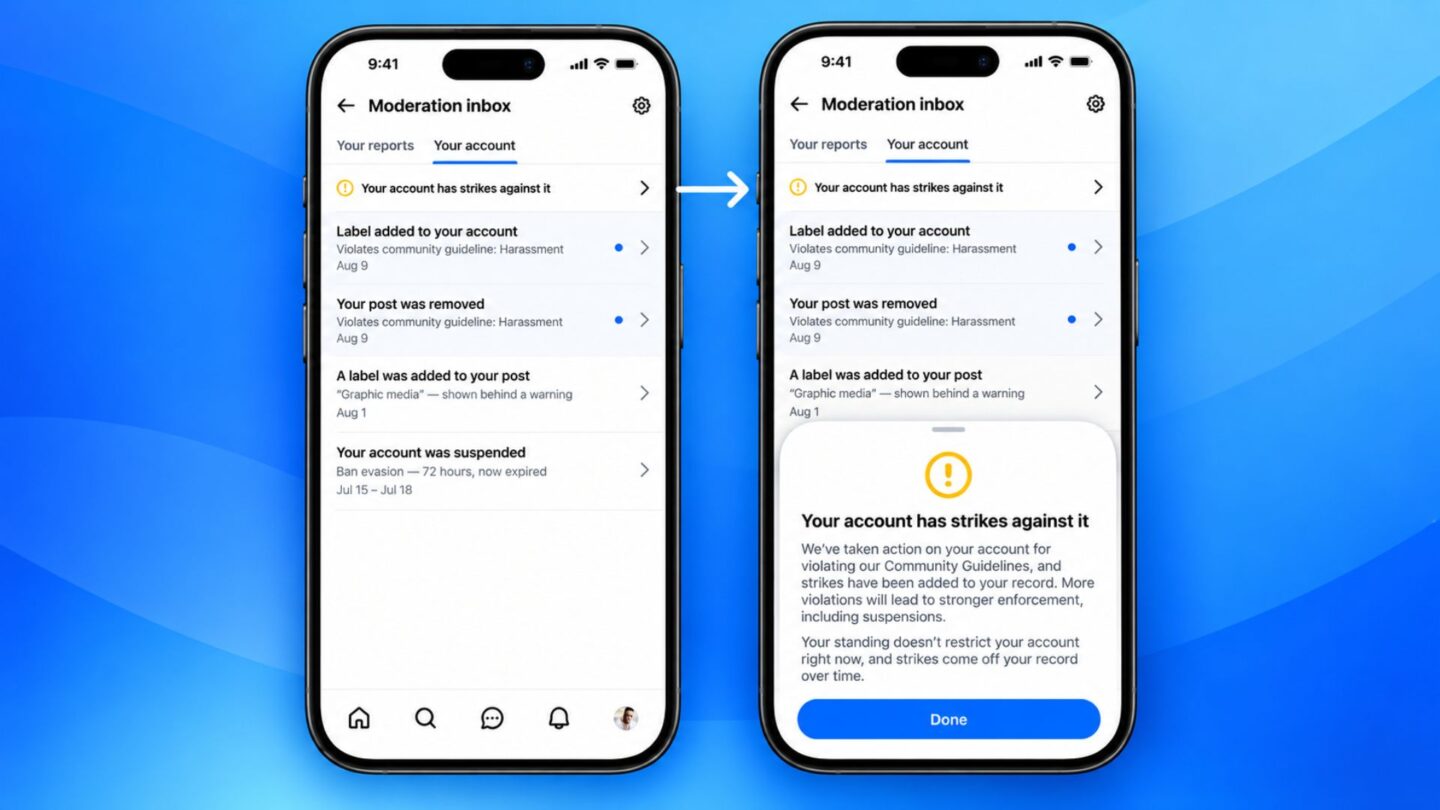
Bluesky has introduced a dedicated moderation inbox designed to give users a clearer view of moderation decisions and actions taken on their accounts. The new feature is rolling out in beta through the Bluesky app, bringing reports, account penalties, and content labels together in one place.
The moderation inbox aims to make it easier for users to understand how the platform handles reports and enforces its community rules. It also provides a more direct way to challenge certain moderation decisions without relying on email.
The update comes as Bluesky continues to develop its moderation tools and improve how it communicates with its growing user base. Alongside the new inbox, the platform has also introduced an optional home screen widget that displays trending topics.
Bluesky brings moderation activity into one place
The new moderation inbox gives users a central location to monitor different types of moderation activity associated with their accounts. This includes reports they have submitted about other users or posts, moderation actions taken against their own accounts, and labels applied to their content.
The feature is currently available in beta and can be accessed through the Bluesky app. To try it, users must first enable beta features in the app’s Settings menu. Once activated, users can find the moderation inbox under the Moderation tools section.
Bluesky has confirmed that the inbox will initially appear empty, even for users who have previously received moderation strikes. This means earlier penalties and decisions will not automatically appear when someone first activates the feature. Instead, the inbox will start collecting information as new moderation activity occurs.
For example, when a user reports a post or another account, the report can appear in the inbox. The same applies when Bluesky takes action against an account or adds a moderation label to one of its posts. This approach gives users a more organised record of their interactions with the platform’s moderation system.
The inbox also lets users appeal most moderation decisions directly in the app. This could make the process more convenient for people who believe that a post or account has been incorrectly flagged. However, account suspensions remain an exception, as affected users must still submit their appeals through the login screen rather than the new inbox.
Bluesky aims to improve moderation communication and appeals
Bluesky says the moderation inbox is intended to make communication between the company and its users more effective. Previously, the platform relied largely on email to inform people about moderation decisions. However, the company found that this approach created difficulties, particularly for users accessing Bluesky through independent servers.
Email communication also meant that users were often contacted only when the platform made serious moderation decisions. As a result, smaller actions and updates throughout the moderation process were not always communicated as clearly.
The new inbox offers an alternative by letting Bluesky send notifications directly to anyone using its official app. It also gives the company a way to share information about different stages of moderation without filling users’ email inboxes with additional messages.
This change could help users better understand why certain actions have been taken and what options are available if they disagree with a decision. Having reports, account restrictions and content labels in one location may also make it easier to follow the progress of moderation cases.
Bluesky has previously received attention for its user-controlled moderation features, particularly its blocking tools. These options allow people to manage their feeds and limit unwanted interactions. However, the company’s own moderation decisions have also attracted criticism.
In 2025, The Guardian reported that Bluesky’s automated spam detection system had repeatedly deactivated accounts belonging to Palestinians who were using the platform to raise funds for essential supplies. Critics argued that the system treated legitimate users as automated accounts, preventing them from accessing their communities and sharing fundraising appeals.
The platform also faced criticism over its handling of posts related to the assassination of Charlie Kirk. Some users questioned how Bluesky applied its moderation rules to discussions surrounding the incident.
These controversies highlighted the importance of clear explanations when platforms restrict accounts or label content. A more accessible moderation system could help address some of these concerns by giving users better visibility into decisions and providing a straightforward way to challenge them.
However, introducing an inbox does not necessarily resolve broader questions about how Bluesky identifies harmful content, handles automated enforcement, or applies its community guidelines. Its effectiveness will depend on how consistently the platform communicates decisions and responds to appeals.
Bluesky adds trending topics widget to its latest update
The moderation inbox is not the only addition included in Bluesky’s latest update. The company also introduced an optional home screen widget that lets users view trending topics without opening the app.
The widget is designed to provide quicker access to subjects gaining attention across the platform. By placing it on a device’s home screen, users can check trending discussions and discover popular topics more conveniently.
The addition gives Bluesky users another way to keep up with conversations across the social network. It also makes trending content more visible beyond the main application interface.
Unlike the moderation inbox, which focuses on account management and communication, the widget is intended to improve content discovery and everyday app access. Both additions reflect Bluesky’s efforts to expand its features while addressing different aspects of the user experience.
The moderation inbox remains a beta feature, meaning its availability and functionality may change as Bluesky continues testing it. To access it, users must enable beta features through the app’s Settings menu.
The introduction of clearer moderation notifications and in-app appeals represents a practical change in how Bluesky communicates with its users. Whether it will improve confidence in the platform’s enforcement decisions will depend on how the company handles future reports, restrictions and appeals.