

The Plaud Note Pro is positioned as a dedicated AI note-taking device built for professional environments. Instead of relying solely on software running on a phone or laptop, it combines a slim physical recorder with cloud-based intelligence to support meetings, interviews, and calls with minimal friction.
This hardware-first approach reflects how work actually happens. Conversations often take place in settings where typing notes, unlocking a phone, or managing recording apps can feel intrusive or impractical. A single-purpose device that starts recording with a single press lets users stay focused on the discussion while ensuring nothing important is lost.
Plaud frames the Note Pro as a tool for clarity rather than capture alone. Recording, transcription, summarisation, and sharing are treated as a single continuous workflow rather than separate steps that require manual effort. The emphasis is on reducing post-meeting work rather than adding new layers of interaction.
As a result, the Note Pro is aimed squarely at professionals who value structure, accuracy, and follow-through. Journalists, consultants, managers, researchers, and founders are the most obvious audience, but its broader appeal lies in how quietly it supports everyday work without demanding attention.
Slim and discreet by design
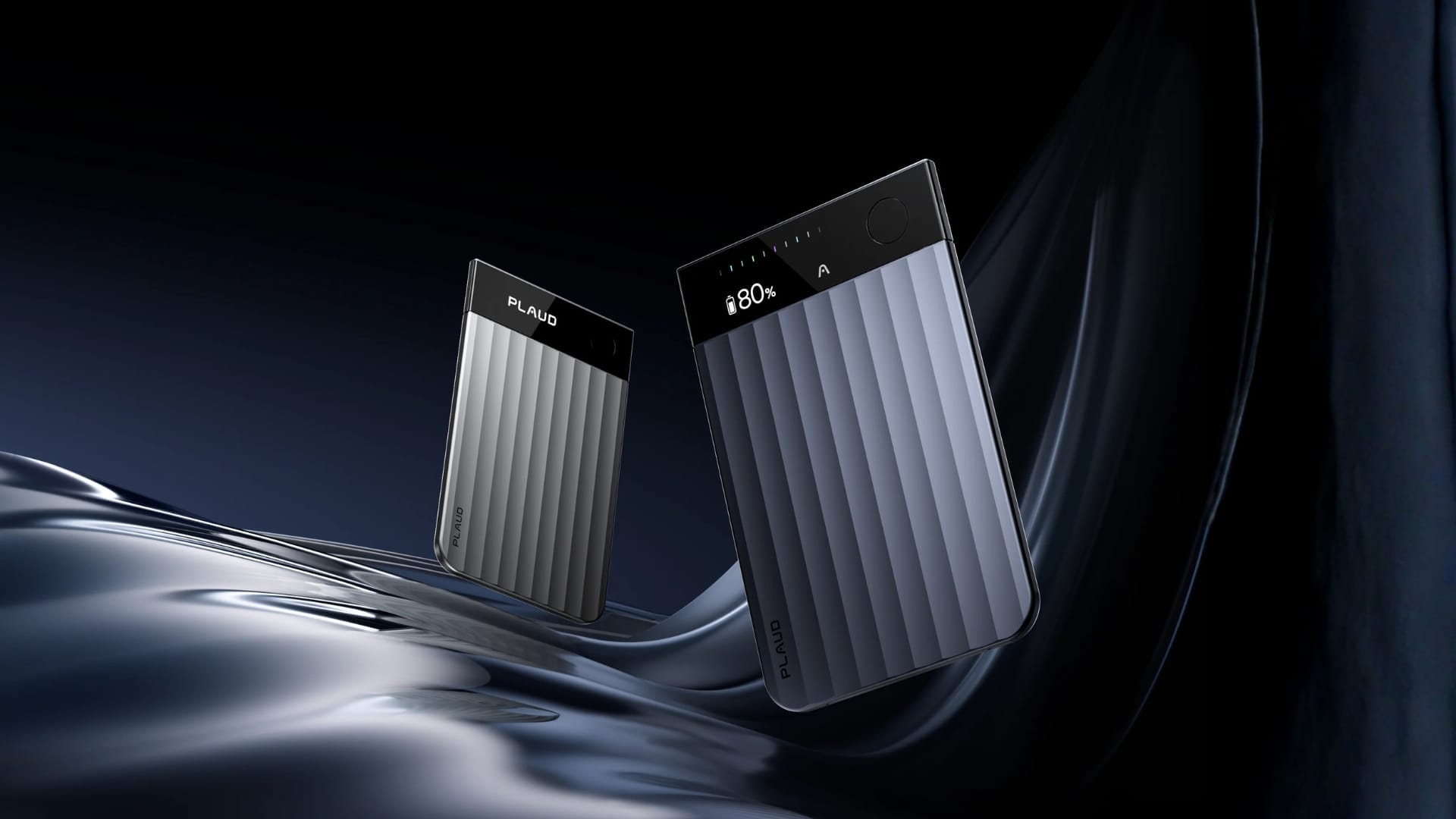
Physically, the Plaud Note Pro stands out mainly for its small footprint. At roughly 3mm thick and weighing about 30g, it feels closer to a slim card holder than a traditional audio recorder. It slips easily into a pocket, notebook sleeve, or laptop bag and remains unobtrusive throughout the day.
The ribbed metal finish gives the device a restrained, professional appearance. Branding is minimal, surfaces are matte rather than glossy, and the overall aesthetic avoids visual noise. When placed on a meeting table, it does not draw attention or signal overtly that recording is taking place, which can matter in sensitive or formal settings.
Controls are deliberately simple. A single button handles recording via a long press, reducing the chance of mistakes or accidental inputs. This design choice works particularly well in fast-moving meetings or interviews, where users do not want to check screens or settings.
A small InstantView display provides essential information such as battery level and recording status. It is functional rather than expressive, reinforcing the idea that the device is meant to work quietly in the background.
Due to its slim form factor, the Plaud Note Pro can be easy to misplace. To address this, the package includes a magnetic ring and a magnetic case, allowing the device to be securely attached to a phone, notebook, or other flat surfaces.
Clear audio with strong endurance
Audio capture is where the Plaud Note Pro establishes its credibility. The device uses four MEMS microphones and a dedicated VPU, supported by AI beamforming, to capture speech clearly across different environments. In practice, this setup performs reliably in both small meetings and larger rooms.
Voices remain distinct even when multiple people are speaking, and clarity holds up when participants are seated several metres away. Plaud rates the pickup range at up to around 5 metres, which comfortably covers most meeting rooms, shared desks, and informal discussion spaces.
Two recording modes are available. Enhance mode prioritises clarity and delivers up to 30 hours of continuous recording, while endurance mode extends recording time to up to 50 hours with a reduced pickup range of just under 3 metres. This allows users to trade reach for battery life depending on context.
Battery endurance is a clear strength in daily use. The Note Pro can handle several days of meetings without recharging, and standby time stretches up to 60 days. With 64 GB of onboard storage and automatic cloud syncing, users are unlikely to encounter power or space limitations during normal professional use.
AI transcription and summarisation features
Once the recording ends, Plaud’s software ecosystem automatically takes over. Audio files sync to the Plaud app, where transcription begins without manual uploads or file handling. Support for 112 languages makes the system suitable for international teams and multilingual environments.
Transcription accuracy is generally strong for clear speech and holds up well with different accents. Speaker labels help distinguish participants in group discussions, which is particularly useful for interviews and meeting notes. The free Starter Plan includes 300 minutes of transcription per month, providing a practical baseline for light to moderate users.
Summarisation is where Plaud’s approach becomes more distinctive. Instead of producing a single generic summary, the system offers more than 10,000 templates designed for different roles and use cases. A single conversation can generate action items, thematic summaries, key quotes, or role-specific briefs without additional setup.
This multidimensional approach reduces the need to rewrite or reinterpret notes for different audiences. In collaborative environments where the same discussion must serve managers, stakeholders, and contributors, the ability to regenerate structured outputs from a single source is a meaningful productivity gain.
Plaud Note Pro vs Otter AI in real-world use
While Plaud Note Pro is positioned as a hardware-led AI note-taking system, it is often compared with transcription-first tools such as Otter AI. Both aim to turn spoken conversations into usable text, but they are built around different assumptions about speed, structure, and what the final output is meant to support.
One of the most immediate differences is how transcription is generated. Otter AI produces transcripts almost instantly, making it well-suited for real-time review and collaboration. Plaud Note Pro requires the user to generate the transcript after recording, which introduces a short delay but allows for more deliberate processing and structuring of the output.
That distinction carries through to readability. Plaud produces a cleaner, more editorial-style transcript, with clearer paragraphing, smoother pacing, and fewer visible artefacts from filler speech or repeated phrases. Speaker labelling is simple but consistent, and timestamps are used more selectively, allowing the text to read more like a narrative than a raw log.
Otter AI takes a more literal approach. It aggressively preserves timestamps, repeats phrases when speakers loop, and surfaces more transcription noise. This makes the output more faithful to the original audio, but also more cluttered and less immediately usable for writing or analysis without manual clean-up.
The divergence becomes more pronounced in summarisation and higher-level analysis. Plaud goes beyond surface summaries by generating structured outputs, including lecture summaries, key quotes, panel discussion breakdowns, intent analysis, and concluding assessments that interpret tone, strategy, and narrative framing. These outputs feel closer to the work of an editorial assistant or analyst, turning spoken content into insight rather than simply condensed text.
Otter AI does offer summaries, keywords, and quote extraction, but its analysis remains largely descriptive. Even its intent analysis reads more like an expanded briefing note, focusing on stated objectives rather than inferred strategy or narrative control. It captures what was said, but stops short of interpreting why it matters.
Workflow design further highlights the difference in positioning. Plaud is optimised for post-recording sense-making, with a template-driven system that encourages users to regenerate different views of the same content without reworking the structure. This suits journalism, research, and study use cases where the end goal is a written output. Otter’s interface is built around conversation playback and collaboration, assuming the user will manually interrogate the transcript.
There is also a practical distinction in how each tool handles online meetings. Otter AI can be added directly to platforms such as Zoom and Microsoft Teams as a meeting participant, enabling it to automatically record and transcribe with minimal setup. Plaud Note Pro does not offer native meeting bot integration. Recording online meetings instead relies on external audio capture methods or other workarounds, which adds a small layer of friction compared to Otter’s built-in approach.
Accuracy underscores the broader trade-off. Otter AI excels at word-for-word transcription, preserving phrasing, repetition, and timing, making it suitable for records, compliance, or scenarios where exact wording matters. Plaud focuses on semantic accuracy, capturing meaning and intent, but its smoothing and consolidation mean it is not always a one-to-one reflection of the original speech.
Pricing reinforces this split in philosophy. Plaud offers a free tier with 300 minutes, a Pro plan at ~US$8.33 (~S$11.42) per month billed annually for 1,200 minutes, and an Unlimited plan at ~US$19.99 (~S$29.17) per month, with most advanced features available across paid tiers. Otter mirrors the entry price but reserves longer meetings, deeper integrations, and admin controls for higher Business and Enterprise plans.
The verdict: Plaud Note Pro
The Plaud Note Pro succeeds by staying focused on a specific problem. It does not attempt to replace productivity suites or collaboration platforms. Instead, it focuses on accurately capturing conversations and turning them into structured, usable outputs with minimal user effort.
Its strengths are most apparent for professionals who regularly convert spoken material into written work. Journalists, consultants, researchers, and managers will benefit from its combination of strong audio capture, readable transcripts, and analytical summaries that go beyond surface-level condensation.
At US$189 (S$259), with optional subscription upgrades, it is considered an investment rather than an impulse purchase. However, the included free transcription plan lowers the barrier to entry and allows users to assess its value before committing further.
Overall, the Plaud Note Pro positions itself less as a meeting companion and more as a thinking and writing aid. By pairing disciplined hardware design with editorially minded AI outputs, it offers a credible alternative to app-only solutions and fits naturally into professional workflows where clarity and interpretation matter more than raw capture.