


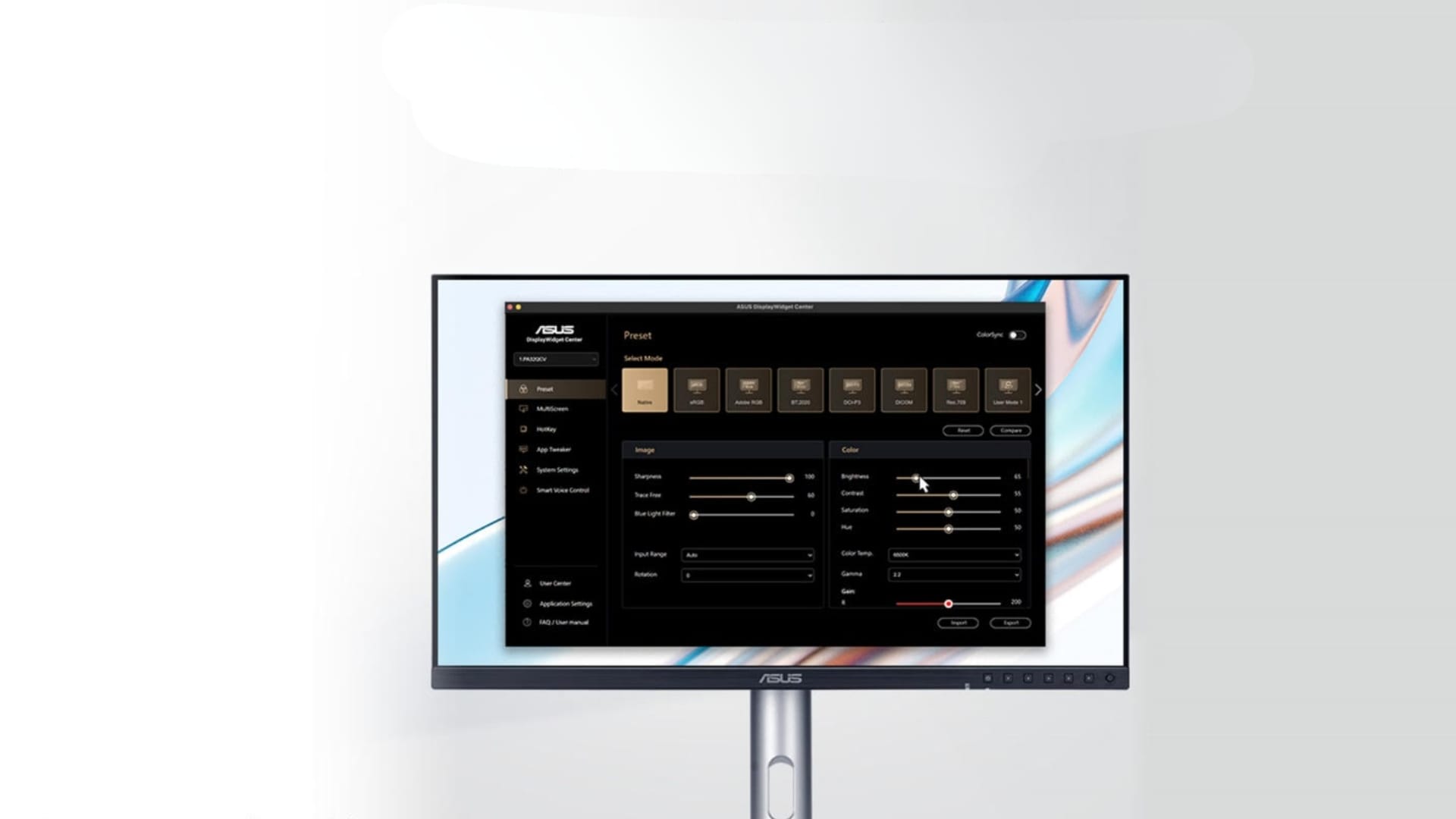
ASUS has introduced a set of Mac-focused features across its ProArt display range, aimed at improving productivity and colour accuracy for users working on macOS. The update centres on new firmware support for ASUS DisplayWidget Center for macOS, alongside colour-matching enhancements designed to align ProArt displays more closely with MacBook screens.
The announcement targets creative professionals using MacBook, Mac mini and Mac Studio systems, positioning ProArt displays as high-resolution companions that integrate more tightly with Apple hardware. The new features are delivered through firmware updates, rather than new hardware launches, allowing existing ProArt users to benefit from expanded functionality.
ASUS highlighted that the updates focus on day-to-day usability as well as colour-critical work, addressing common workflow gaps faced by designers, photographers and video editors who rely on external monitors alongside Mac devices.
Deeper macOS integration for everyday control
At the centre of the update is ASUS DisplayWidget Center for macOS, a software tool that provides an on-screen interface for adjusting monitor settings. Through the app, users can fine-tune brightness, contrast and colour temperature directly from macOS, removing the need to navigate physical buttons or on-screen display menus.
With the software installed, MacBook shortcut keys can also be used to control the brightness of connected ProArt displays. This brings external monitors closer to the native behaviour of Apple displays and simplifies multi-screen setups where consistent brightness control is essential for long working sessions.
ASUS also introduced a new M Model P3 colour mode, designed specifically to match the colour performance of ProArt displays with MacBook screens. The feature aims to maintain visual consistency across devices, particularly when moving content between the built-in display of a MacBook and an external ProArt monitor during editing or review.
Colour accuracy and calibration for professional work
Colour performance remains a core focus of the ProArt range. ASUS stated that each ProArt display is factory-calibrated to meet Calman Verified standards, delivering up to Delta E<1 colour accuracy. Support for a wide 99 percent DCI-P3 colour gamut ensures coverage suitable for photo, video and graphic design workflows.
ProArt Calibration software supports both SDR and HDR workflows on macOS, allowing hardware calibration that saves colour profiles directly to the monitor’s internal scaler chip. This approach avoids dependence on system-level settings and helps maintain consistent output across different devices connected to the display.
The calibration ecosystem extends to ICC profile generation for ProArt displays, other monitors and MacBook screens, enabling a more uniform colour pipeline. Users can schedule regular calibrations and work with a broad range of compatible calibrators, including tools from X-Rite, Calibrite, Datacolor, Klein and Colorimetry Research, as well as ASUS’ own ProArt CaliContrO MCA02.
Connectivity, comfort and added creative value
Beyond colour and software integration, ProArt displays are positioned as central connectivity hubs for Mac-based workstations. Built-in USB-C and Thunderbolt 4 support enables high-speed data transfers, DisplayPort compatibility and up to 96W power delivery, allowing MacBooks to be charged through a single cable.
Additional connectivity options include HDMI and DisplayPort with daisy-chain support, while integrated USB hubs allow peripherals to connect directly through the monitor. An Auto KVM feature supports seamless switching between two connected MacBooks or PCs using a single keyboard and mouse.
For long hours at the desk, ProArt displays feature ergonomic stands with tilt, swivel and height adjustment, alongside a quick-release VESA mounting system. TÜV Rheinland-certified Flicker-Free and Low Blue Light technologies are included to reduce eye strain, with adjustable blue light filtering accessible through the on-screen display menu.
ASUS also confirmed that selected ProArt displays are bundled with a free three-month Adobe Creative Cloud subscription in eligible regions, covering applications such as Photoshop, Lightroom, Premiere Pro and Illustrator. The redemption period runs until 31 August 2026, adding software value for creative professionals purchasing into the ProArt ecosystem.