

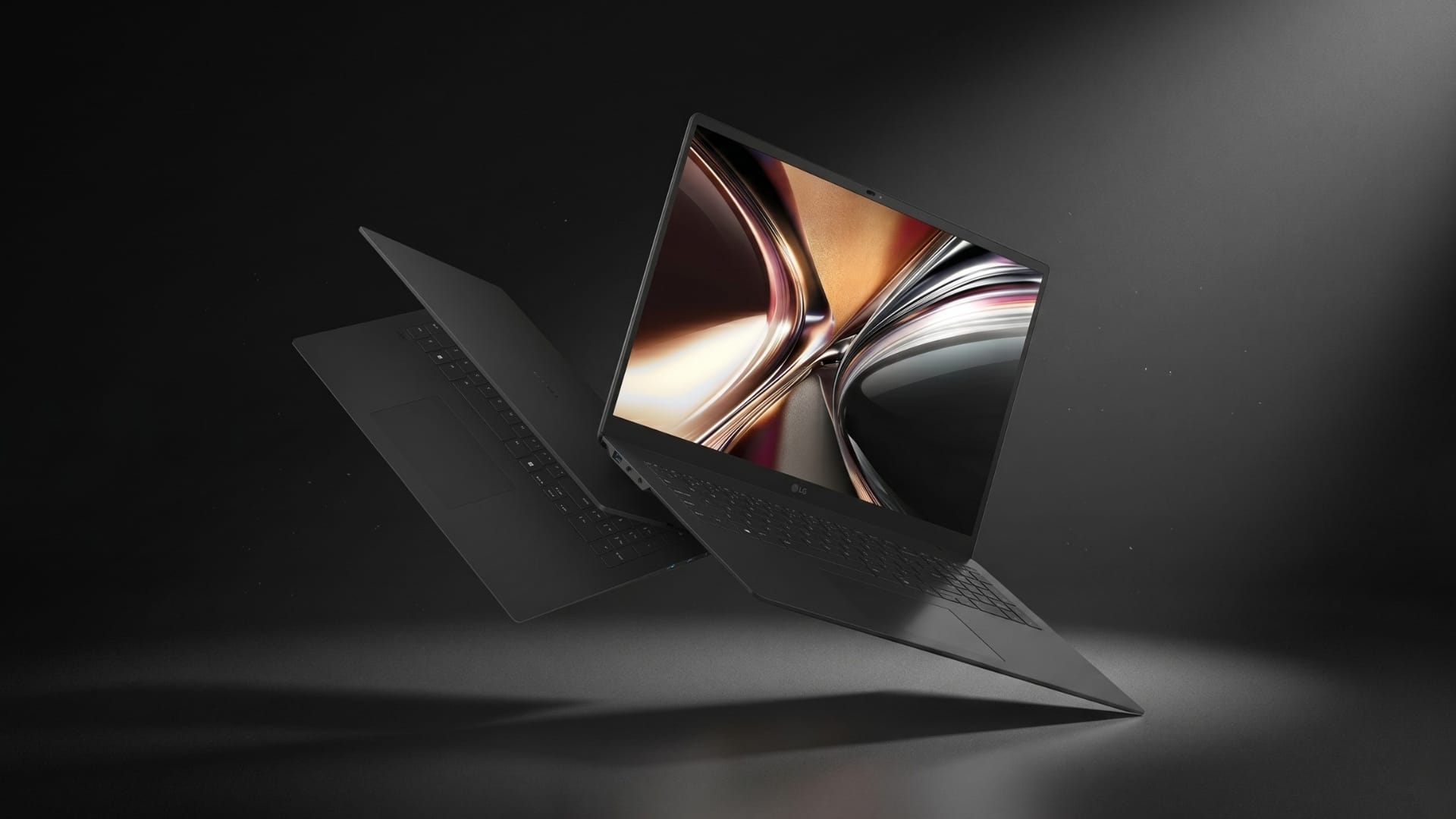
The LG gram Pro AI brings the gram series into large-screen territory while keeping the familiar emphasis on portability. It is a 17-inch laptop for users who want more room for work, media, and multitasking without moving into the weight class usually associated with large notebooks.
Our verdict
The LG gram Pro AI is a large-screen ultraportable that gives users a 17-inch workspace without the usual carrying weight. Its slim chassis, vibrant display, solid build, practical ports, strong CPU performance, and stable benchmark results make it well suited to productivity, content review, research, and multimedia use, though its larger footprint, shallow key travel, and integrated graphics keep it away from smaller ultraportables, heavy creator laptops, and gaming machines.
Pros
- Light and slim for a 17-inch laptop, with little to no chassis flex
- Vibrant 17-inch display provides useful room for work, media, documents, and multitasking
- Strong CPU performance and stable stress-test results support productivity use
Cons
- Larger footprint makes it less convenient than smaller ultraportables in tight spaces
- Shallow key travel may not suit users who type for long periods
- Integrated graphics limit gaming and GPU-heavy creator workloads
That gives the laptop a specific appeal. It is not built around raw graphics power or workstation-class output. Its value depends on whether the large screen, slim chassis, keyboard layout, ports, and everyday performance work together as a practical mobile productivity machine.
A light chassis with a larger physical footprint
The LG gram Pro AI is light and slim, which makes it stand out immediately for a 17-inch laptop. At 1,379g, it avoids the weight penalty commonly associated with large-screen notebooks. Its thickness of 13.3 to 15.98mm also helps it feel more portable than its screen size suggests.
The main trade-off is footprint. The laptop is thin, but it remains physically large because it has to accommodate a 17-inch panel and a full-size keyboard. It takes up more bag space and desk space than a 13-inch or 14-inch ultraportable. Users who prioritise a minimum footprint may find the chassis too large for tight café tables, compact desks, or smaller backpacks. Users who regularly work across documents, browser tabs, spreadsheets, slides, dashboards, or content tools will get more value from the additional screen area.
The larger body also allows for a full-size keyboard with a numeric keypad. That is useful for users who work with numbers, spreadsheets, finance documents, or data entry. With a chassis profile measuring just 13.3mm at its thinnest point, key travel is structurally limited, a characteristic trade-off in ultraportable designs that may not satisfy users who prefer deeper tactile feedback during extended typing sessions.
In terms of the design, the black finish gives the laptop a sleek, restrained appearance and resists fingerprints and smudges better than expected, helping the machine maintain a cleaner look through daily use.
LG lists MIL-STD-810H testing across seven durability categories, including low-pressure, high- and low-temperature storage and operation, salt fog, vibration, and shock. This does not make the laptop a rugged field machine, but it supports the idea that the chassis is designed for regular movement and daily transit rather than solely for static desk use.
The port selection enhances the laptop’s productivity. It includes two USB 3.2 Type-A ports, two USB 4 Type-C ports with Thunderbolt 4, Power Delivery, and DisplayPort support, one HDMI 2.1 port, and a headset jack. This mix reduces dependence on dongles in common work setups. Users can connect external displays, storage, accessories, and power without having to reach for a dock.
The 77Wh battery also fits the mobility-led design. LG claims up to 27.5 hours of video playback under controlled test conditions, measured at 150 nits brightness with wireless off and headphones at default volume. Real-world endurance will vary depending on screen brightness, wireless use, background apps, and workload.
A 17-inch display that earns the extra space
The 17-inch display is the clearest reason to consider the LG gram Pro AI. It gives users more room for multimedia, work documents, spreadsheets, browser windows, research tabs, and content management tools. For users who often work across multiple windows, the extra screen real estate makes the laptop feel less cramped than on smaller ultraportables.
The 2560 x 1600 WQXGA resolution and 16:10 aspect ratio help with vertical space, especially when scrolling through long documents, editing articles, reviewing reports, or managing spreadsheets. This is where the 17-inch form factor earns its place. It gives mobile users some of the benefits of an external monitor without requiring a fixed desk setup. That is useful for productivity users who often move between locations but still want a larger workspace.
The display also works well for multimedia. The larger panel makes video playback, presentations, and visual review more comfortable than on smaller ultraportables. Colours appear vibrant, which helps with media viewing, content review, and light creative work.
The IPS LCD panel is listed with 350 nits of brightness, 99% typical DCI-P3 colour coverage, a 1200:1 typical contrast ratio, and an anti-glare finish. In use, 350 nits is bright enough for typical indoor work. It should be fine in offices, homes, cafés, classrooms, and meeting rooms. That said, it is not ideal for direct sunlight, where higher brightness would be needed to maintain comfortable visibility.
The anti-glare finish helps the display fit better into productivity use than a more reflective panel. It reduces distractions under indoor lighting, which is more useful than chasing a glossy, high-contrast look that becomes harder to manage in mixed lighting.
The display is tuned more for productivity and media consumption than motion performance. Its 60Hz refresh rate and 30ms typical response time are sufficient for writing, editing, browsing, calls, presentations, and video playback, but they also make clear that this is not a panel for gaming or fast-motion creative workflows. That fits the laptop’s broader hardware balance, where the U-series processor and integrated graphics point toward mobility and everyday efficiency rather than high-refresh performance.
Fast for productivity, modest for graphics
The LG gram Pro AI is powered by an Intel Core Ultra U7 355 processor with Intel integrated graphics and 32GB LPDDR5x memory. Testing with Geekbench 6 and 3DMark gives the laptop a clear performance profile: strong CPU responsiveness for productivity work, useful light GPU compute, and a firm graphics limit for demanding 3D or creator workloads.
In Geekbench 6, the laptop scored 2,523 in single-core and 10,521 in multi-core. The single-core result points to quick everyday responsiveness, covering tasks such as opening apps, switching browser tabs, handling PDFs, editing documents, joining video calls, and navigating Windows. For common office, browser, and content workflows, the score supports the gram Pro AI’s role as a fast productivity machine.
The multi-core score gives the laptop enough headroom for heavier multitasking. It supports browser-heavy research, file handling, office workloads, coding, light media editing, and AI-assisted productivity tasks. The multi-core score is about 4.17 times the single-core score, showing that the processor can scale across cores within the power and thermal limits of a slim chassis. This places the chip firmly in productivity laptop territory, below the sustained output expected from thicker workstation-class machines.
Geekbench OpenCL returned a score of 21,536. This measures GPU compute instead of gaming performance. It shows that the integrated Intel graphics can assist with lighter visual workloads such as image processing, filters, interface acceleration, and selected AI-assisted tasks. It should not be treated as a substitute for discrete GPU performance.
3DMark Steel Nomad makes the graphics limit clear. The laptop scored 600, with the graphics test running at 6 FPS. That result rules out demanding modern 3D games, high-end rendering, complex 3D modelling, and GPU-heavy creator workflows as natural use cases. The integrated graphics remain suitable for everyday visual acceleration, video playback, casual games, older titles, and lighter workloads at reduced settings.
The stress-test results add useful nuance to the performance profile. The LG gram Pro AI achieved 98.2% frame-rate stability in Steel Nomad Light, 99.0% in Wild Life, and 97.8% in Wild Life Extreme. The gap between the best and worst loop stayed narrow across all three tests: about 1.8% in Steel Nomad Light, 0.9% in Wild Life, and 2.2% in Wild Life Extreme.
These results show modest graphics performance with strong consistency. The laptop does not have a high graphics ceiling, but it holds its available performance well across repeated benchmark loops. For a slim 17-inch laptop, that stability gives a more complete performance picture than the raw Steel Nomad score alone.
The results are encouraging for productivity users. The laptop has the CPU power needed for daily work, and its performance remains steady across repeated light graphics benchmark loops. The limitation remains GPU-heavy use: demanding games, 3D rendering, and heavier creator tasks sit outside its intended range.
AI tools need to earn their place in daily work
The LG gram Pro AI includes Copilot+ PC support, Intel’s AI-focused processor, and LG’s Dual AI layer. LG’s gram chat On-Device is designed for local document search and summarisation, while gram chat Cloud extends the feature set through online AI functions.
The more practical part is local file handling. Users who work with reports, proposals, PDFs, meeting notes, and internal documents may benefit from being able to search and summarise files stored on the laptop. Offline use also gives the feature a clearer role for users who need access to documents when connectivity is limited.
LG also includes gram Link for file sharing, screen mirroring, photo organisation, and mobile alerts across iOS, Android, and webOS devices. This fits the large-screen format well. A 17-inch display gives users more room to review files, photos, and phone content once they are moved onto the laptop.
The feature set comes with several practical limits as well. gram chat On-Device is designed for straightforward, one-time requests rather than ongoing conversations, and it currently supports English and Korean. LG also places limits on document handling, while screen recall is opt-in and uses local storage to keep periodic captures. The AI battery usage detection feature requires at least 80 hours of pattern learning before it can adapt to usage behaviour.
These limits do not make the AI layer unhelpful, but they define how it should be viewed. The most useful features are likely to be the ones tied to specific tasks, such as finding local files, summarising stored documents, moving content across devices, or changing system settings more quickly. For this laptop, AI works better as a supporting productivity layer than as the main reason to buy it.
The verdict: LG gram Pro AI
The LG gram Pro AI is strongest as a large-screen ultraportable for productivity users. Its 17-inch display provides ample space for work and multimedia, while its light, slim body makes it much easier to carry than many laptops of this size.
Its physical compromise is footprint rather than weight. The laptop is slim and light, but it remains large because of the screen and full-size keyboard. That makes it better suited to users who want a mobile large-screen machine, rather than those who want the smallest possible travel laptop.
The display is bright enough for indoor use with vibrant colours, and the black finish resists smudges well. The structurally limited key travel, a consequence of the 13.3mm thin profile, may not satisfy users who write heavily and prefer deeper tactile feedback.
Performance testing reinforces the productivity focus. Geekbench 6 shows strong CPU responsiveness and solid multitasking capability from the Intel Core Ultra U7 355. 3DMark shows that integrated graphics limit demanding gaming and GPU-intensive creative work, but stress tests show good sustained stability across repeated benchmark runs.
That stability is one of the laptop’s more valuable results. The integrated graphics performance is modest, but the ability to hold that performance across repeated loops without significant throttling is a meaningful characteristic for a thin 17-inch machine.
The AI features add another layer of utility, especially around local document search, summarisation, and cross-device file handling, but they need to prove their value against existing tools that many users already rely on. The more defensible case for the LG gram Pro AI lies in its large display, low weight, responsive CPU, practical ports, and stable benchmark behaviour.
For executives, editors, researchers, marketers, students, consultants, and mobile professionals who need more screen space without carrying a heavy workstation, the LG gram Pro AI is a practical option. Buyers looking for high-refresh gaming, discrete GPU performance, heavy video editing, or deeper typing feedback should look elsewhere.