


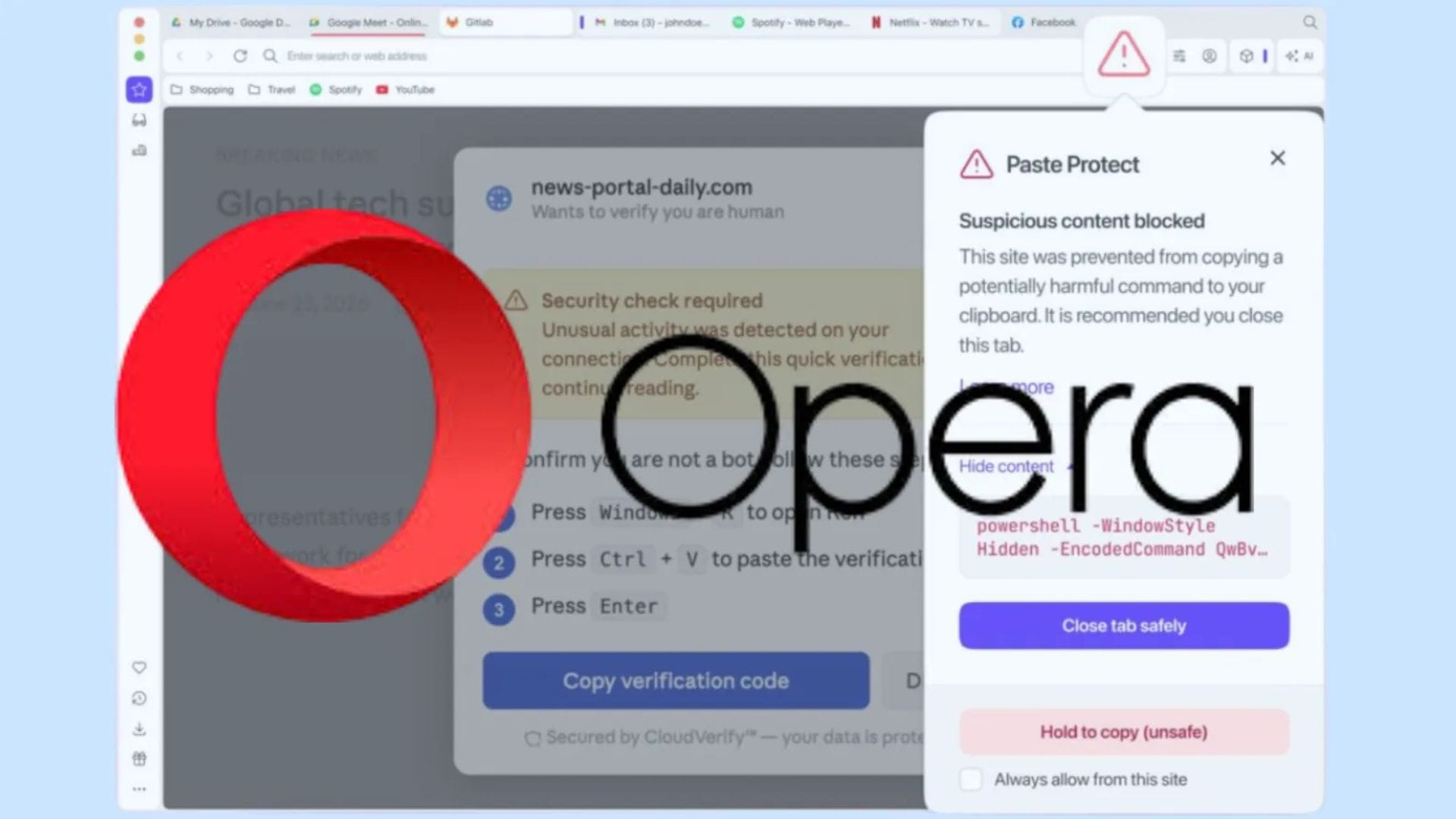
Opera has introduced a new security feature designed to protect users from a growing type of cyberattack that tricks people into copying and running malicious code on their own devices. Called Paste Protect, the feature is built directly into the browser. It is enabled by default, making Opera the first major browser to include native protection against ClickFix-based clipboard attacks.
The new feature aims to tackle one of the fastest-growing social engineering techniques used by cybercriminals. According to Opera, ClickFix attacks accounted for more than half of malware-loading cyberattacks during 2025, highlighting the increasing threat posed by clipboard-based attacks that rely on user interaction rather than software vulnerabilities.
How ClickFix attacks work
ClickFix attacks are designed to deceive users into carrying out harmful actions themselves. Instead of exploiting a software weakness, attackers create convincing prompts that appear on malicious websites. These prompts often resemble CAPTCHA verification requests, browser errors or security warnings that encourage users to complete a series of steps.
When a user clicks a button such as “I’m not a robot”, the website secretly copies a malicious command to the computer’s clipboard. The page then displays instructions asking the user to open the Windows Run dialogue or a terminal, paste the copied command, and press Enter. Because the user acts voluntarily, the attack can bypass many traditional security measures.
The copied command usually instructs the computer to visit a remote website, download a file and execute it. Attackers often disguise the code with additional characters or commands to make it appear harmless. Once executed, the malware can install information-stealing software that can collect saved passwords, browser cookies, autofill data, and other sensitive information stored on the device.
Opera described the scale of the problem in its announcement, stating: “With Paste Protect, Opera becomes the first major browser to include a native protection and warning system against ClickFix-based cyberattacks, which accounted for over half of malware-loading cyberattacks in 2025.”
Paste Protect blocks malicious clipboard activity
Paste Protect is designed to stop these attacks before the malicious command reaches the user’s clipboard. The browser analyses clipboard activity and identifies suspicious commands commonly associated with ClickFix attacks across Windows, macOS and Linux systems.
If the browser detects a potentially harmful command, it blocks the copy action before the content is placed on the clipboard. Opera then displays a warning that a website attempted to copy suspicious content. A red warning icon also appears in the browser’s address bar, indicating that potentially dangerous activity has been detected.
To help users understand what was blocked, Opera displays the first 120 characters of the intercepted command. If the browser incorrectly flags a trusted website, users can choose to mark the site as safe. This option is particularly useful for developers and advanced users who regularly copy legitimate scripts or commands from trusted sources.
The company said the new feature builds on its existing clipboard protection technology. While earlier protections focused on preventing clipboard hijacking, where copied information such as cryptocurrency wallet addresses or banking details could be replaced with fraudulent data, Paste Protect expands these defences by preventing malicious commands from being copied in the first place.
Feature rolls out to Opera users
Paste Protect is enabled by default in supported desktop versions of Opera, allowing users to benefit from the protection without changing any settings. Those who prefer to manage the feature manually can find it under the Privacy & Security section of the browser’s Settings menu, where it can be turned on or off as needed.
The company said the feature has been designed to provide an additional layer of protection against increasingly sophisticated social engineering attacks. Rather than relying solely on antivirus software or operating system safeguards, Opera aims to prevent malicious commands from executing before users can.
Opera is already known for its built-in tools, including a free virtual private network, an integrated ad blocker, and memory-efficient browsing features. Paste Protect joins the browser’s growing list of security-focused capabilities as online threats continue to evolve.
The update is expected to roll out gradually to Opera users across different regions. Once available, the feature will automatically begin protecting users from clipboard-based attacks, helping reduce the risk of malware infections caused by deceptive website prompts.