

Portable keyboards and mice usually follow a predictable formula. They save space in a bag by trimming down comfort, key travel, and hand support. For an hour in a café or a short stretch between meetings, that bargain is easy enough to accept. Over a full afternoon of work, it becomes much easier to feel what has been given up.
Our verdict
A compact keyboard and mouse combo built for mobility and quiet use, with clear trade-offs in long-session comfort and ergonomics.
Pros
- Slim, lightweight design that fits easily into a bag and works well in tight spaces
- Quiet typing and soft mouse clicks suit shared and mobile work environments
- Reliable multi-device switching across up to three devices
Cons
- Shallow key travel becomes less comfortable over extended typing sessions
- Flat mouse design offers limited support for prolonged use
- Fixed keyboard angle with no height adjustment reduces ergonomic flexibility
The Logitech Pebble 2 Combo is built around the same compact-first idea, but it executes it better than many travel-focused keyboard and mouse sets. It combines the Pebble Keys 2 K380s with the Pebble Mouse 2 M350s, focusing on portability, quiet use, and easy switching between multiple devices.
In day-to-day use, the combo feels tidy and straightforward. The keyboard stays planted better than its size suggests, the mouse is quick enough for routine work, and the overall footprint is small enough to fit almost anywhere. For users who often move between locations, that convenience is the main appeal.
Small enough to carry anywhere
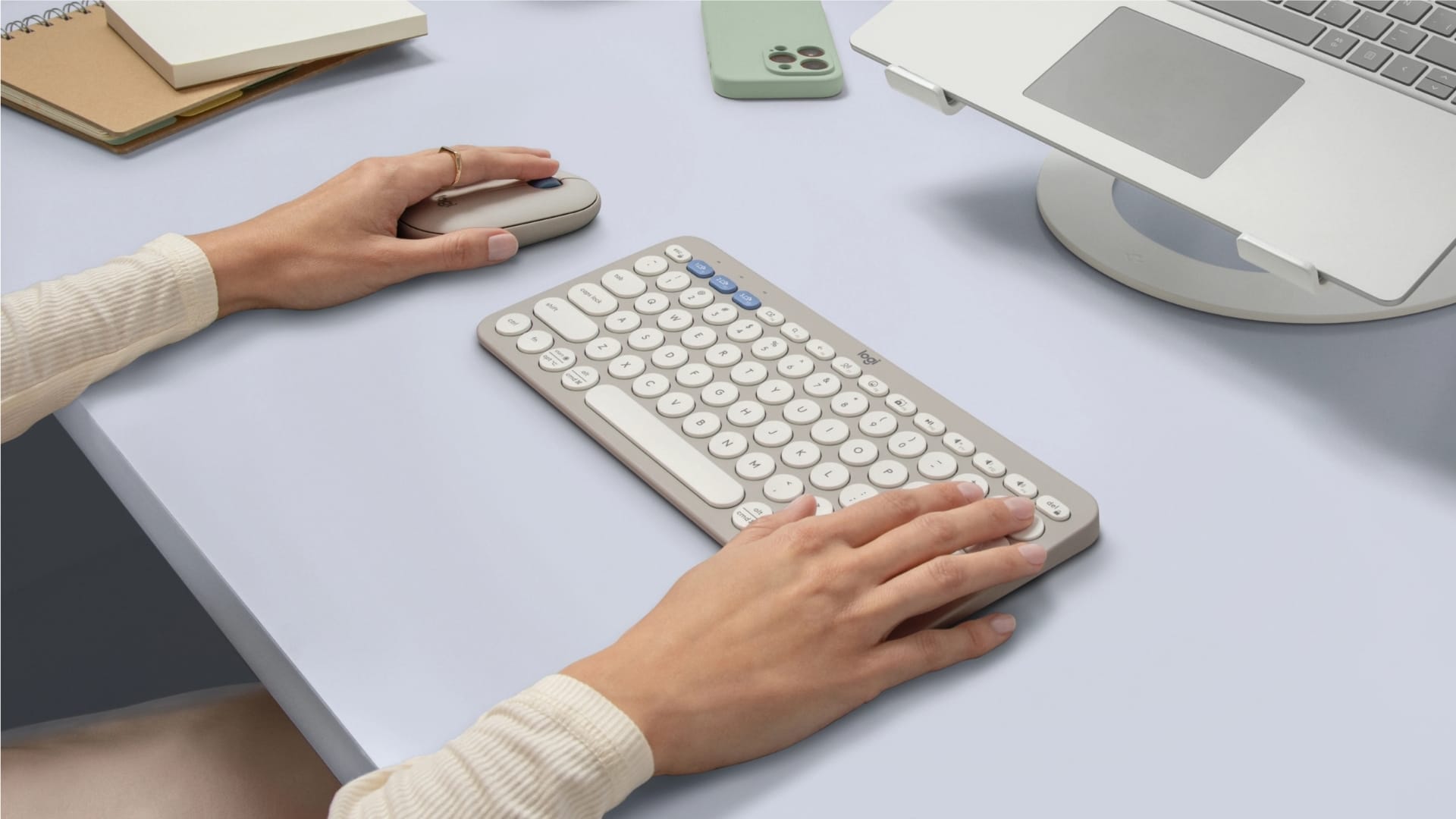
Portability is where the Pebble 2 Combo makes its strongest first impression. Logitech has kept both pieces slim and light, with the keyboard measuring 279mm across and 16mm thick, weighing 415g with batteries installed. The mouse adds only 76g and stays very low to the desk, with a flat shape that slips easily into a laptop sleeve or a small pocket in a work bag.
That compactness gives the combo an obvious practical edge. It disappears into a backpack without needing its own case, and it takes up so little room on a desk that it works just as easily on a cramped café table as it does beside a laptop in a meeting room.
The keyboard’s function row adds more flexibility than expected from something this minimal. Standard media controls sit alongside shortcut keys for emoji, screen capture, search, and voice dictation. Through Logitech’s software, these can be reassigned to better suit different workflows, making the keyboard feel a little more adaptable than its simple layout suggests.
The mouse follows the same stripped-back logic. It keeps to the basics, left and right buttons, a scroll wheel, and a shape that favours fingertip or claw grip over any kind of full-hand support. It is easy to move, easy to pack, and does exactly what it is supposed to do without adding bulk.
The compromise, predictably, shows up with longer sessions. The keyboard has no adjustable feet, so the typing angle is fixed. The mouse also offers very little contouring, leaving the hand with little to settle on. During short bursts, neither issue stands out, but over a longer work session, especially one that involves frequent cursor movement, both become easier to notice.
Quiet operation across keyboard and mouse
Its low noise profile is one of the more immediately noticeable strengths. The keyboard is quiet even during steady typing, and the mouse clicks are soft enough that they do not draw attention in a shared workspace. For people working around others, that matters.
The typing experience feels closer to a laptop keyboard than to a conventional desktop model. The short-travel scissor switches keep each press light and quick, which suits email replies, note-taking, and general productivity work. There is enough stability in the keys that typing never feels loose or flimsy, but there is less depth and resistance than on a full-sized keyboard.
That becomes more noticeable during longer sessions. For a while, the keyboard feels efficient, even pleasant. After sustained use, the shallow travel and limited key movement can feel less satisfying, particularly for users who spend hours drafting, editing, or navigating large amounts of text. It remains functional, but it offers little in the way of physical support or typing richness.
The circular, scooped keycaps add another layer of adjustment. They are not difficult to get used to, but they do shift finger placement slightly compared with a more standard layout. Touch typists will likely adapt after a bit of use, though the difference is obvious at the beginning.
The mouse follows a similar pattern. It tracks reliably, the scroll wheel is predictable, and the quiet clicks suit its low-profile character. For browsing, replying to messages, or moving between windows, it works without issue. The flat body, however, gives the hand very little to rest on. Most movement comes from the fingers, and over time, that posture feels tighter and less relaxed than a fuller-sized mouse.
Fast switching with stable connection
The Pebble 2 Combo makes a stronger case for itself when used across multiple devices. Both the keyboard and mouse can pair with up to three devices, and Logitech’s Easy-Switch controls make moving between them simple enough to become part of a normal routine. Jumping from a laptop to a tablet or phone takes only a moment, and the transition is smooth enough that it rarely breaks concentration.
For hybrid workers and users with separate work and personal devices, the ability to carry a single keyboard and mouse rather than manage multiple accessories makes the combo far more practical. It is one of the clearest reasons to choose this set over a cheaper, single-device alternative.
Pairing over Bluetooth is straightforward, and Logitech also supports the Logi Bolt receiver. That gives the combo a bit more relevance in office environments where Bluetooth can be inconsistent, crowded, or restricted by IT policy. In those situations, having the option of a receiver-based connection is more useful than it sounds on paper.
Connection stability is solid in normal use. Keystrokes register cleanly, pointer movement remains consistent, and switching between paired devices happens without awkward delays or repeated reconnecting. During testing, the experience stayed dependable enough that connectivity never became a distraction.
Long battery life with minimal upkeep
Battery life is another area where the Pebble 2 Combo keeps things simple. The keyboard uses two AAA batteries and is rated for up to 36 months, while the mouse runs on a single AA battery with a quoted lifespan of up to 24 months. Actual battery life will vary, but the broader point holds, this is a setup that asks for very little attention.
That low-maintenance design suits the product well. There are no charging cables to remember, no battery anxiety before leaving the house, and no need to keep another USB-C lead on standby. The keyboard and mouse can sit in a bag for days, then be turned on and used immediately without a second thought.
For travel and daily commuting, that is a genuine convenience. Rechargeable devices have their place, but battery-powered accessories like these remove one more routine from the day. The keyboard’s power switch is placed along the side, while the mouse keeps its switch underneath, both easy enough to access before packing away.
The only real upkeep comes much later, when the batteries eventually need replacing. Until then, the combo remains almost invisible from a maintenance perspective, which is entirely in keeping with its purpose.
Basic use works without software
The Pebble 2 Combo works perfectly well without any additional software. Pairing is simple, the main functions are available immediately, and there is nothing the user has to install just to get started. That is useful in managed work environments or on shared devices where adding software is either inconvenient or not allowed.
Installing Logi Options+ provides greater flexibility. Shortcut keys on the keyboard can be reassigned, and the mouse’s middle button can be mapped to other functions, including system controls, navigation tools, and app-specific commands. For users with established routines, this can make the setup feel more tailored.
Logitech also supports multiple profiles for different applications, so the same input can trigger different actions depending on what is open. Smart Actions extend this further by linking several steps to a single press. These features are useful, though they do not fundamentally change the nature of the hardware itself.
The verdict: Logitech Pebble 2 Combo
The Pebble 2 Combo works best when judged for what it is, a compact secondary setup built for movement. It slips into a bag without fuss, works quietly in shared spaces, and handles multi-device switching well enough to be genuinely useful for hybrid work. For commuters, students, and anyone who needs a neat keyboard and mouse set that can travel with easily, it is a polished and practical option.
Its limits are tied directly to that portability. The keyboard is comfortable enough for everyday tasks, but the shallow travel and fixed angle are less convincing over long writing sessions. The mouse is responsive and easy to carry, though its flat shape offers very little support during extended use.
That leaves the Pebble 2 Combo in a fairly clear position. It is a strong travel companion and a very capable backup kit, but it is not a substitute for a full-sized workstation. Users spending full days on spreadsheets, editing, or sustained desk work will still be better served by something larger and more ergonomic.