

Blackmagic Design has released version 3.3 of its Blackmagic Camera app for iOS, introducing a new Apple Watch companion and enhanced broadcast-style controls aimed at solo creators and live production users. The update expands the app’s remote capabilities and strengthens its role as a professional-grade mobile video tool.
The Blackmagic Camera app is widely regarded as one of the more advanced third-party video recording tools available for smartphones. With Apple Watch integration, users can now control and monitor recordings directly from their wrist, offering greater flexibility for individuals working alone or filming in dynamic environments.
The new release also adds deeper compatibility with Blackmagic’s professional hardware ecosystem. This includes support for ATEM switchers and dedicated camera control accessories, reinforcing the company’s push to position smartphones as viable tools in broadcast and streaming workflows.
Apple Watch control brings new flexibility for solo creators
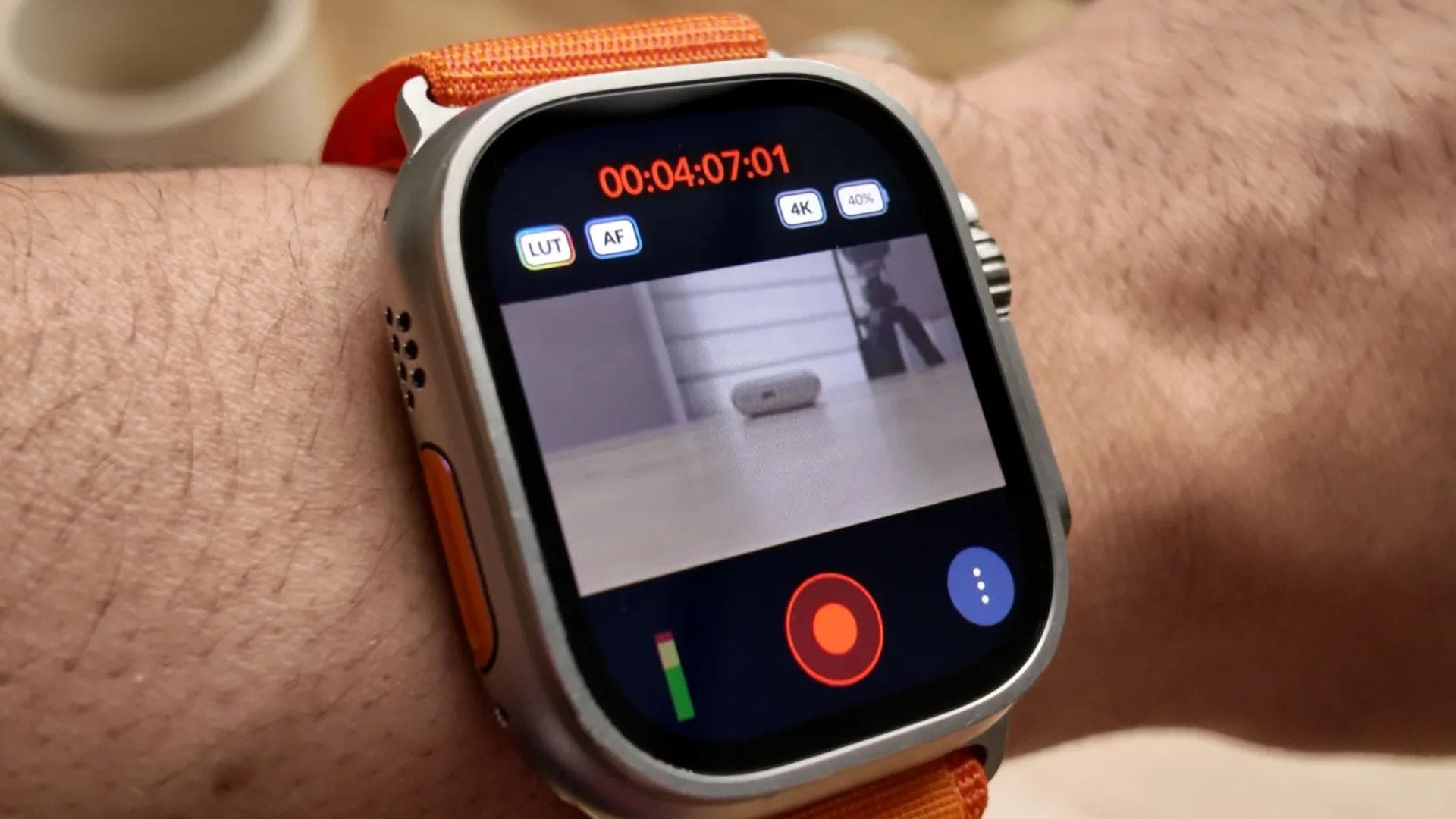
A key feature of the update is the introduction of a dedicated Apple Watch companion app that lets users remotely control the Blackmagic Camera app over Wi-Fi. This feature enables filmmakers and content creators to operate their iPhone camera remotely without physically handling the device.
Through the Watch interface, users can start and stop recordings, adjust zoom levels, and change camera settings such as frame rate, shutter speed, angle, white balance, and ISO. The Watch display also provides a live video preview, allowing users to check framing while recording. However, due to the small screen size of a smartwatch, it may be less suitable for precise tasks such as confirming focus.
The addition is expected to appeal particularly to solo creators who mount their iPhone on a tripod to record stand-up presentations, interviews, or vlog-style content. In these situations, remote control reduces the need to move back and forth between the camera and filming position. Setting up the feature is designed to be straightforward: install the Watch companion on the paired iPhone, then the devices automatically connect and synchronise.
By extending remote functionality to the wrist, the update reflects a broader trend in mobile filmmaking towards greater independence and efficiency. Solo operators can now manage more aspects of production without assistance, making smartphone-based filming more practical in professional and semi-professional settings.
Broadcast integration expands professional production potential
Another major addition in version 3.3 is expanded integration with Blackmagic’s ATEM Mini switchers, commonly used by live streamers and broadcast teams. This feature enables an iPhone to serve as a live studio camera in a multi-camera production environment.
To enable this capability, users require the Blackmagic Camera ProDock, priced at US$420. The ProDock provides HDMI output, timecode support, USB-C connectivity, and additional ports for compatible devices such as the iPhone 17 Pro and iPhone 17 Pro Max. Once connected, a single HDMI cable links the iPhone to an ATEM Mini switcher, enabling direct control over camera settings and recording functions.
Within this setup, users can adjust focus and zoom, start or stop recordings, and modify image parameters in real time. The update also introduces access to a DaVinci primary colour corrector, allowing creators to match colour profiles and apply film-style looks during live production rather than relying solely on post-production adjustments.
This integration signals a growing acceptance of smartphones as practical tools within professional workflows. While using a smartphone as a broadcast camera may still appear unconventional, the addition of professional-grade connectivity and colour tools brings the device closer to traditional production standards.
The approach also benefits smaller studios, independent streamers, and remote production teams seeking flexible alternatives to dedicated broadcast cameras. By enabling advanced control features through widely available mobile hardware, Blackmagic Design is lowering barriers to entry for live production setups.
Hardware control and performance improvements enhance usability
In addition to software-based features, the update introduces compatibility with Blackmagic’s Focus and Zoom Demand accessories. These hardware controls, consisting of a knob and handle system, are typically used with broadcast cameras to provide smooth and precise manual operation.
When paired with a compatible iPhone and connected to the ProDock via USB-C, these controls let users adjust focus and zoom without removing their hands from the tripod handles. This setup is particularly useful in live or studio environments where maintaining stable framing and movement is essential.
When combined with ATEM integration, these accessories enable an iPhone to be operated in a manner similar to a traditional broadcast camera. Although the sight of a smartphone serving as a full studio camera may seem unusual, the workflow demonstrates how mobile devices are increasingly capable of handling professional production demands.
Beyond hardware support, version 3.3 also introduces ProRes RAW stabilisation, offering improved image steadiness for high-quality recordings. The update includes general bug fixes and performance improvements designed to enhance overall reliability and usability across supported devices.
Blackmagic Camera for iOS version 3.3 is available as a free download from the Apple App Store, making the new features accessible to a wide range of users without additional software cost. With the combination of wearable controls, professional hardware integration, and performance upgrades, the update reinforces smartphones’ growing role as serious tools for video production.