

Microsoft is reportedly testing a new Copilot feature that could make it easier for Windows users to understand their computer’s performance and identify potential hardware or storage issues.
The feature, known as PC Insights, is designed to let users ask questions about their computer using everyday language. Instead of searching through Windows Settings or opening Task Manager, users could ask Copilot about storage space, processor activity, battery health and other system information.
According to a report from Windows Latest, Copilot could answer practical questions such as, “Do I have enough space for a 100GB game?” The AI assistant would then check the computer’s available storage and provide a response based on the system’s current capacity.
The feature could offer a simpler way for less experienced users to access technical information. However, early reports have also raised questions about Copilot’s own use of system resources and whether the assistant could contribute to some of the performance concerns it is designed to identify.
PC Insights could simplify system checks
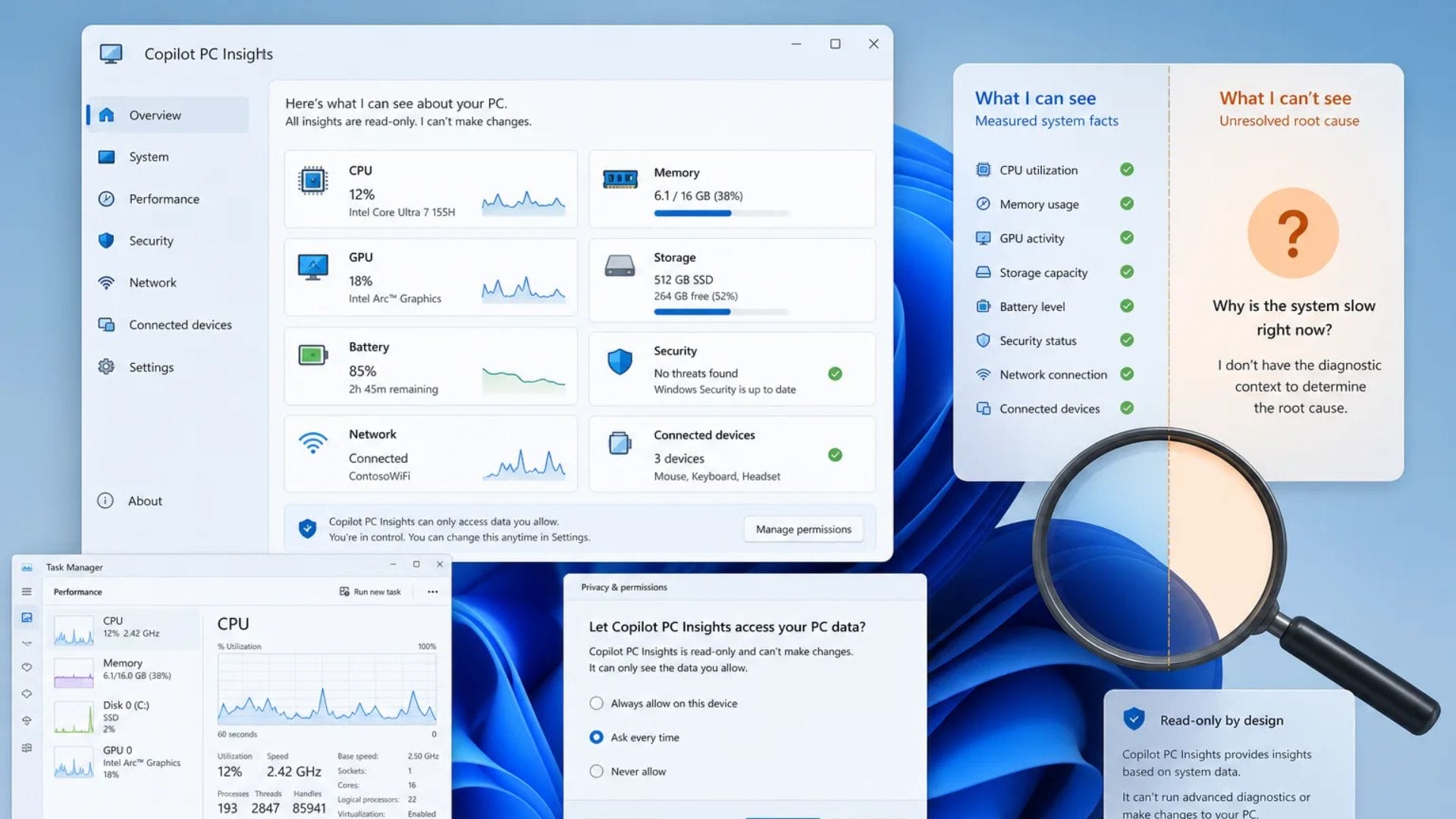
PC Insights is expected to provide information on several key components of a Windows computer. A Microsoft support document reportedly indicates that Copilot will be able to read processor, memory and graphics usage. This could help users understand whether certain parts of their computer are under heavy demand.
The assistant may also calculate the amount of free storage available and check the size of common folders, including Downloads and Documents. This could make it easier for users to identify where storage space is being used without manually reviewing folders or navigating through several menus.
Users may be able to ask questions about their computer in the same way they would speak to a technical support representative. For example, someone experiencing slower performance could ask whether memory usage is unusually high. Copilot could review the available system information and explain what it finds in simpler terms.
The feature may also provide details on battery health, which could be useful for laptop users who notice shorter battery life between charges. Although Windows already provides access to much of this information, PC Insights could bring the details together through a conversational interface.
Microsoft appears to be positioning Copilot as a more integrated Windows assistant rather than a separate AI chatbot. Giving the service access to system information could allow it to offer more relevant answers for the device being used.
Copilot may review connected devices and network status
PC Insights is also expected to recognise devices connected to a computer. This may include USB accessories, external storage drives, printers and webcams. Users could potentially ask Copilot whether a device has been detected instead of checking different areas of Windows.
The assistant may also be able to review the status of Bluetooth and Wi-Fi connections. This could help users investigate basic connectivity issues, such as why a wireless accessory is unavailable or whether the computer is connected to a network.
Access to system information will reportedly be optional. Copilot is expected to request permission whenever a user asks a hardware-related question. Users may also select the “Always allow” option if they do not want to approve access each time.
The permission system could give users more control over when Copilot can view information about their computer. The feature is not expected to provide unrestricted access to personal content, and reports indicate that the AI assistant will not be able to open or read individual files.
At this stage, PC Insights appears to focus mainly on identifying and explaining possible problems. It is not expected to make system changes or automatically repair issues. Users may still need to follow troubleshooting instructions or adjust settings themselves after receiving information from Copilot.
The limited approach may reduce the risk of the AI assistant making unwanted changes. It could also allow Microsoft to test how users respond to deeper Copilot integration before expanding the feature’s capabilities.
Copilot’s resource use raises questions
Although PC Insights could make computer diagnostics more accessible, concerns have emerged about the amount of system resources the Copilot application uses.
Testing carried out by Windows Latest reportedly found that the current Copilot app can use up to 1GB of RAM while idle. This means the application may continue to use a significant amount of memory even when a user is not actively interacting with it.
The app also reportedly requires a considerable amount of storage because it includes its own private copy of Microsoft Edge. This design may allow Copilot to operate independently, but it could increase the application’s overall impact on a computer.
The findings create an unusual situation in which an assistant designed to identify performance problems may also use resources that could affect system performance. The impact may be less noticeable on newer computers with large amounts of memory, but it could be more significant on older or lower-powered devices.
Microsoft has not yet confirmed when PC Insights will become widely available. As the feature remains under testing, its capabilities, permission controls and resource requirements could change before a broader release.
If Microsoft reduces Copilot’s memory and storage demands, PC Insights could become a useful tool for users who find traditional Windows diagnostic features difficult to navigate. Its success may depend on whether the convenience of conversational system checks outweighs the resources required to run the AI assistant.